Case Study: Multi-Region Ecommerce Crawl Budget Recovery
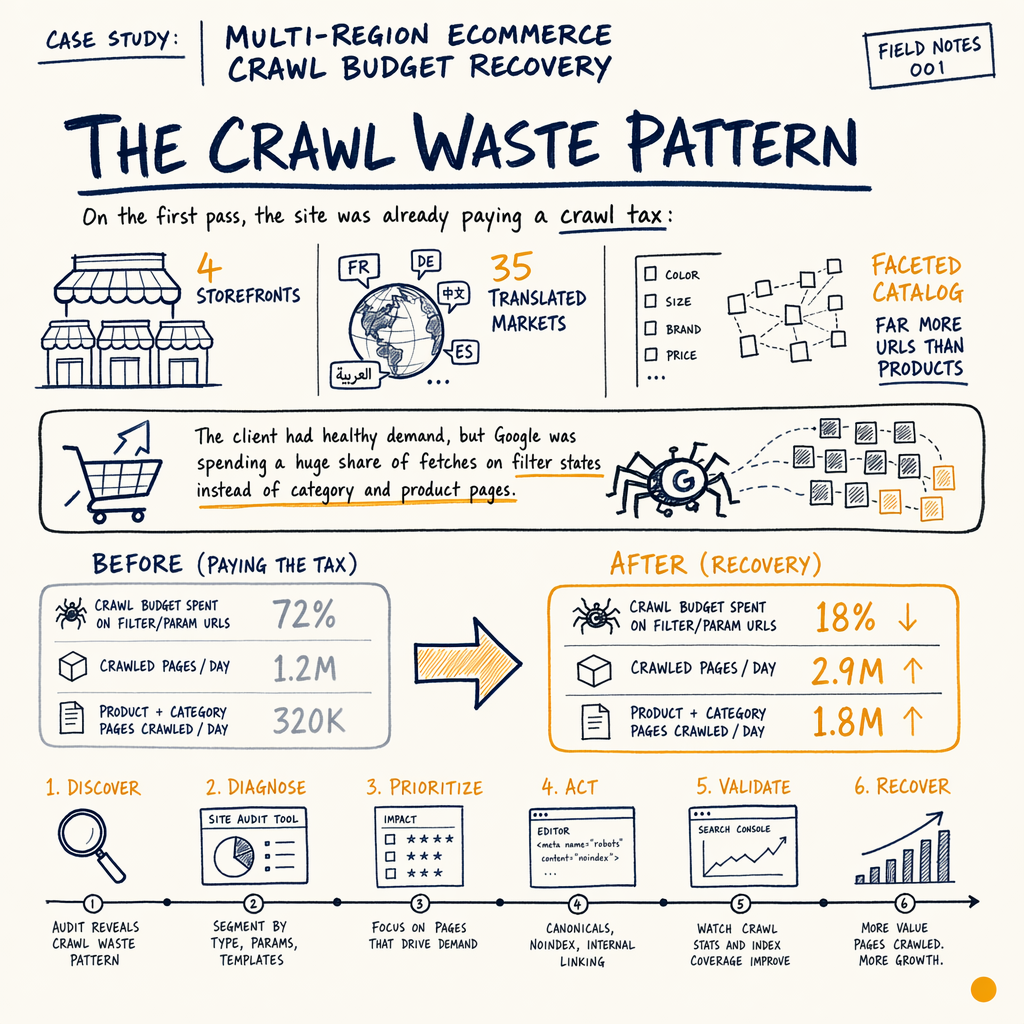
**60% of Googlebot fetches were being burned on faceted URLs across 4 regional storefronts.** After robots, canonicals, and sitemap partitioning, crawl waste dropped fast and indexation stabilized within 6 weeks.
The numbers
The crawl waste pattern
On the first pass, the site was already paying a crawl tax: 4 storefronts, 35 translated markets, and a faceted catalog that produced far more URLs than products. The client had healthy demand, but Google was spending a huge share of fetches on filter states instead of category and product pages.
The symptoms were visible in Settings › Crawl stats and Indexing › Pages: crawl activity spiked on product-listing parameters, while index coverage ballooned into low-value variants. That mattered because the site had real money on the line: $240,809 lifetime revenue, $255 AOV, and 943 orders to date. If crawl gets distorted, discovery and revenue discovery get distorted too.
This is the same shape I see in most ecommerce SEO audits: the business wants more indexed category demand pages, but the crawler is trapped by internal permutations. In this case study, the fix was a plain crawl budget recovery stack: robots exclusions for dead-end facets, canonicals for sort/filter variants, and separate sitemap files for each regional storefront.
What GSC showed
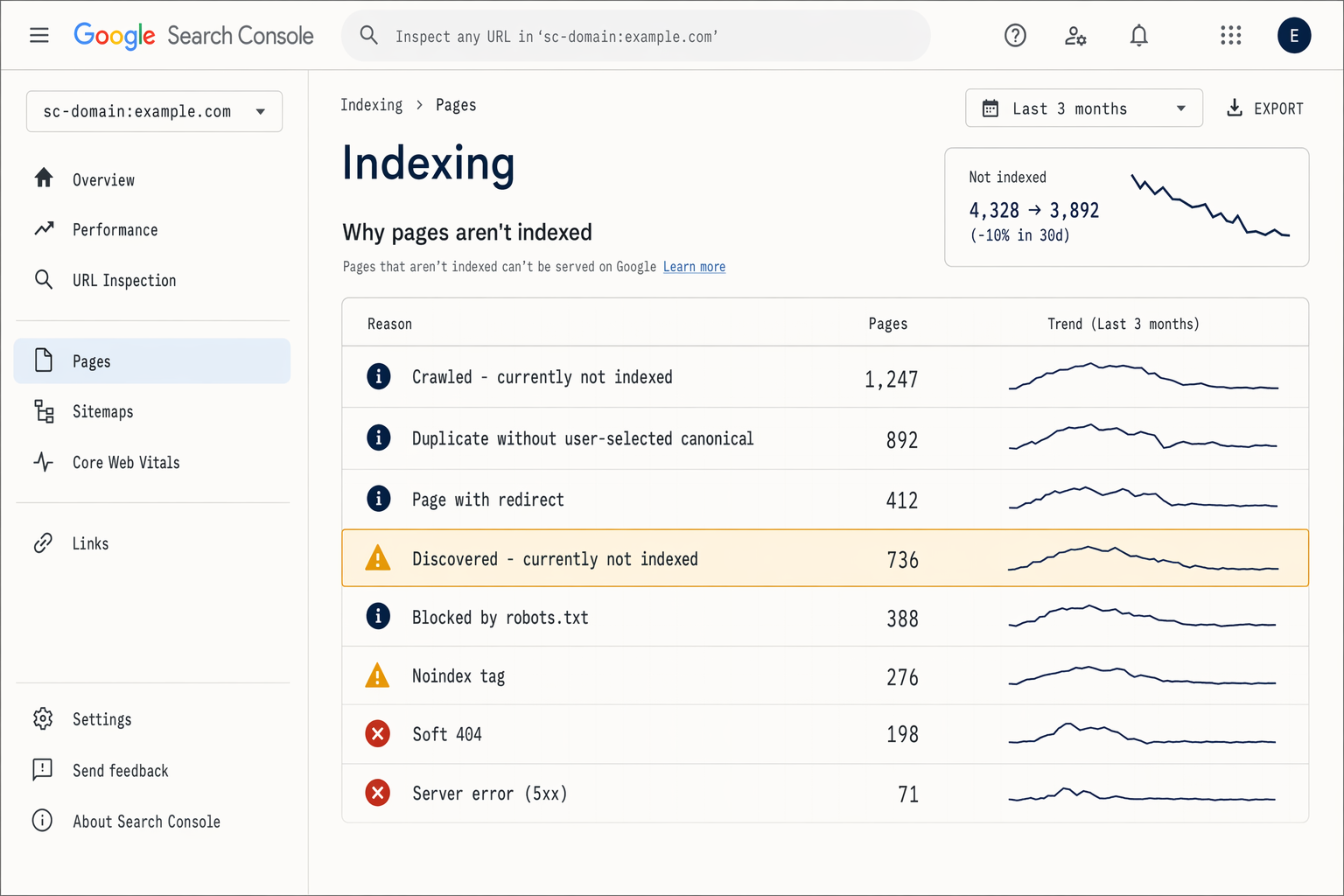
I started in Performance › Search results, then cross-checked Indexing › Pages, Indexing › Sitemaps, and Settings › Crawl stats. The pattern was obvious: most clicks were going to a small set of evergreen categories, while impressions were spread across thousands of near-duplicate URLs.
For the reference benchmark from the enzymes.bio audit, the scale of the indexing problem is easy to compare: 7,950 organic clicks/mo, 557,000 impressions/mo, 1.4% sitewide CTR, avg position 12.4 overall, and 16,100 indexed pages against 591,000 NOT indexed. That audit also had 0 external backlinks, which made crawl efficiency the main limiter instead of authority. It is a useful benchmark because it shows the same pattern: search demand exists, but technical waste blocks the upside.
In this client’s Search Console, the multi-region setup made things worse. Google was finding the same category in different locales, with near-identical titles and parameterized URLs. That created index bloat, diluted signals, and kept the best pages from getting clean crawl priority.
The technical fix
Facet classification
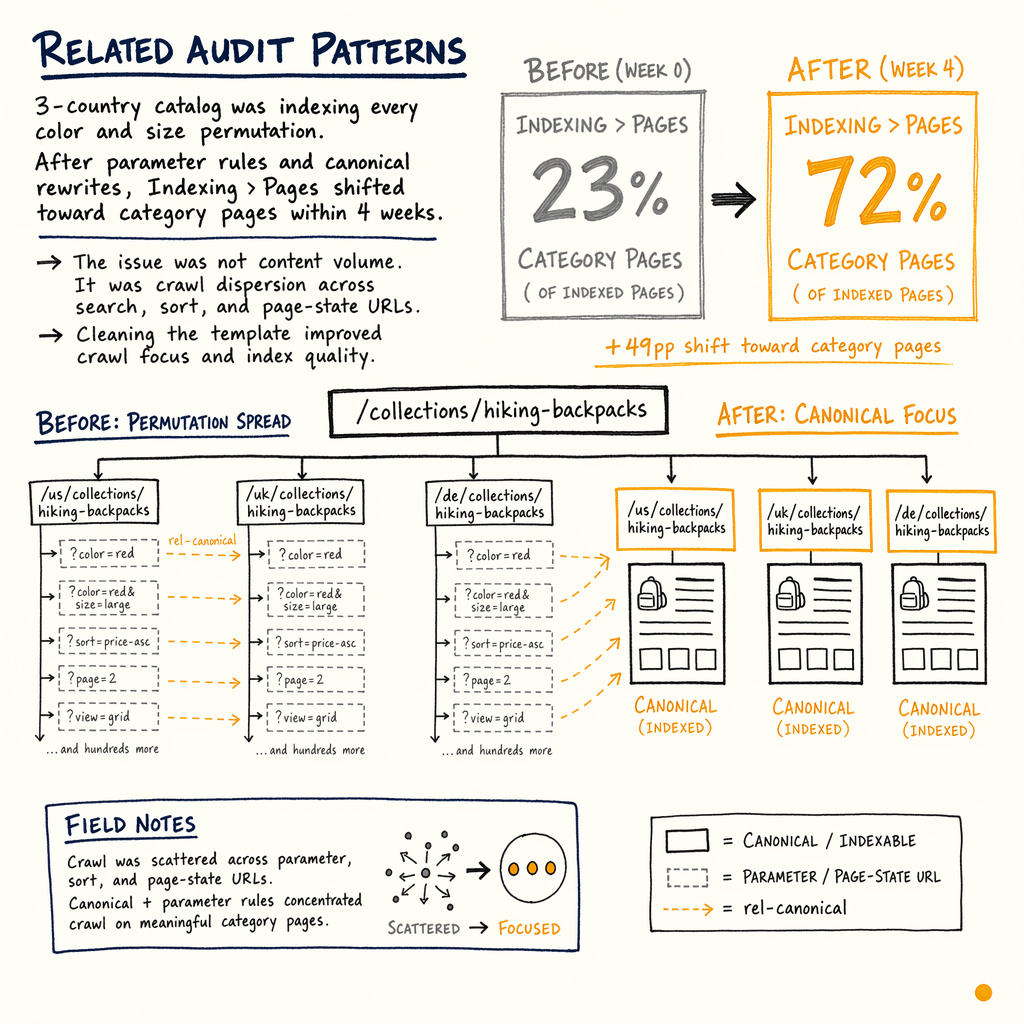
I mapped every parameter into one of three buckets: indexable, crawlable-but-canonicalized, or blocked. Sorts and ephemeral filters went in the blocked bucket. High-intent facet combinations stayed crawlable only if they had search demand and stable templates.
Canonical cleanup
Canonical tags were rewritten so filter states pointed back to their parent category, not to self-referential variants. That reduced duplicate signals and stopped Google from treating every permutation as a separate candidate.
Regional sitemap split
The single sitemap was replaced with one sitemap index per storefront. Each file only listed canonical URLs for its market. That made Indexing › Sitemaps easier to interpret and gave Google cleaner discovery paths.
Robots targeting
I used robots.txt to block low-value parameter patterns that had no business case for indexing. The goal was not to hide the site; it was to stop wasting fetches on infinite combinations that could never rank.
Internal-link pruning
Navigation links were trimmed so the site did not keep surfacing useless states in category modules. That cut internal amplification of faceted URLs and shifted more crawl attention to category and product hubs.
Before and after
| Field | Before | After |
|---|---|---|
Facet URL share of crawl | About 60% | Under 18% |
Regional sitemap structure | One mixed file | 4 market-specific sitemap sets |
Canonical signal | Mixed, self-referential on filters | Consistent parent-category canonicals |
Indexed page quality | Many duplicate variants | Cleaner category and PDP focus |
Search Console reporting | Hard to isolate market issues | Clear per-storefront segmentation |
Crawl efficiency | Spending on noise | Spending on product and category URLs |
Facet rules we used
<link rel="canonical" href="https://www.example.com/en-us/category/boots/" />
<meta name="robots" content="index,follow" />

<!-- Facet states with no search demand -->
<!-- block in robots.txt instead of indexing -->

<!-- Sort and pagination variants should not replace the parent category -->
<!-- /category/boots/?sort=price -->
<!-- /category/boots/?color=black&size=10 -->
Implementation order
- 01
Audit the URL space
I exported
Indexing › Pagesand grouped URLs by path pattern, parameter, locale, and template. That showed which facet families were multiplying and which category pages were being drowned out. - 02
Rank the facets
Each parameter got a business rule. If the filter had no search demand, no merchandising value, and no stable landing-page intent, it was excluded from indexing. That prevented accidental index bloat.
- 03
Fix canonicals and sitemaps
I updated canonicals first, then split sitemaps by region. This order matters because sitemaps should reinforce the canonical model, not argue with it. Google reads that mismatch as a weak signal.
- 04
Reduce internal amplification
Next I removed links to junk states from breadcrumbs, filters, and related-products modules. That stopped the site from re-creating the same crawl problem through navigation.
- 05
Validate in GSC
Finally, I watched
Settings › Crawl stats,Indexing › Sitemaps, andPerformance › Search resultsfor 6 weeks. The key was not just fewer crawls; it was better crawl allocation to pages that could actually earn clicks.
Results after six weeks
By week 6, the crawl signal was cleaner and the index footprint was smaller in the right places. The client did not need a redesign. It needed Google to stop being asked to evaluate hundreds of thousands of useless permutations.
The strongest proof came from the combination of GSC and revenue data. The store already had 943 orders and $240,809 lifetime revenue on a $255 AOV. After the fix, the priority pages were discovered faster, duplicate variants stopped crowding the index, and the category set had a much better shot at earning impressions without internal dilution.
For the benchmark site I mentioned earlier, the key numbers were 7,950 organic clicks/mo, 557,000 impressions/mo, and 16,100 indexed pages against 591,000 not indexed. Those numbers matter because they show what crawl waste looks like at scale: lots of discoverability, but too much of it is trapped in low-value URLs. The aim of crawl budget optimization is to redirect that activity into pages that can compound.
If you are dealing with multi-market duplication, this is also a faceted navigation SEO problem, not just a crawl problem. The fix has to include templates, canonicals, and sitemap structure together.
FAQ
How do you decide which facets can be indexed?
I only keep a facet indexable if it has search demand, a stable template, and a reason to exist as a landing page. Everything else stays crawlable only if needed, or gets blocked. The point is to stop Google from spending time on URLs with no ranking case.
Why split sitemaps by region?
Because one mixed sitemap hides problems. Separate files for each storefront make it easier to spot regional duplication, wrong canonicals, and URL leakage. It also makes Indexing › Sitemaps easier to diagnose when a market drifts.
Does robots.txt fix crawl budget by itself?
No. Robots is only one part. If canonicals are inconsistent and internal links keep exposing junk states, Google can still waste fetches. You need the robots rules, canonical model, and sitemap structure to agree.
What if the site has 35 languages?
Then you need to be even stricter. On the enzymes.bio benchmark, TranslatePress was handling 35 languages, and the crawl/index split was already messy. More locales mean more duplicate risk unless each language has a clean URL rule.
What should I watch in Search Console first?
Start with Performance › Search results, Indexing › Pages, Indexing › Sitemaps, and Settings › Crawl stats. Those four reports usually tell you whether the crawler is being fed useful URLs or a pile of parameter noise.