Schema markup types: which schema to use
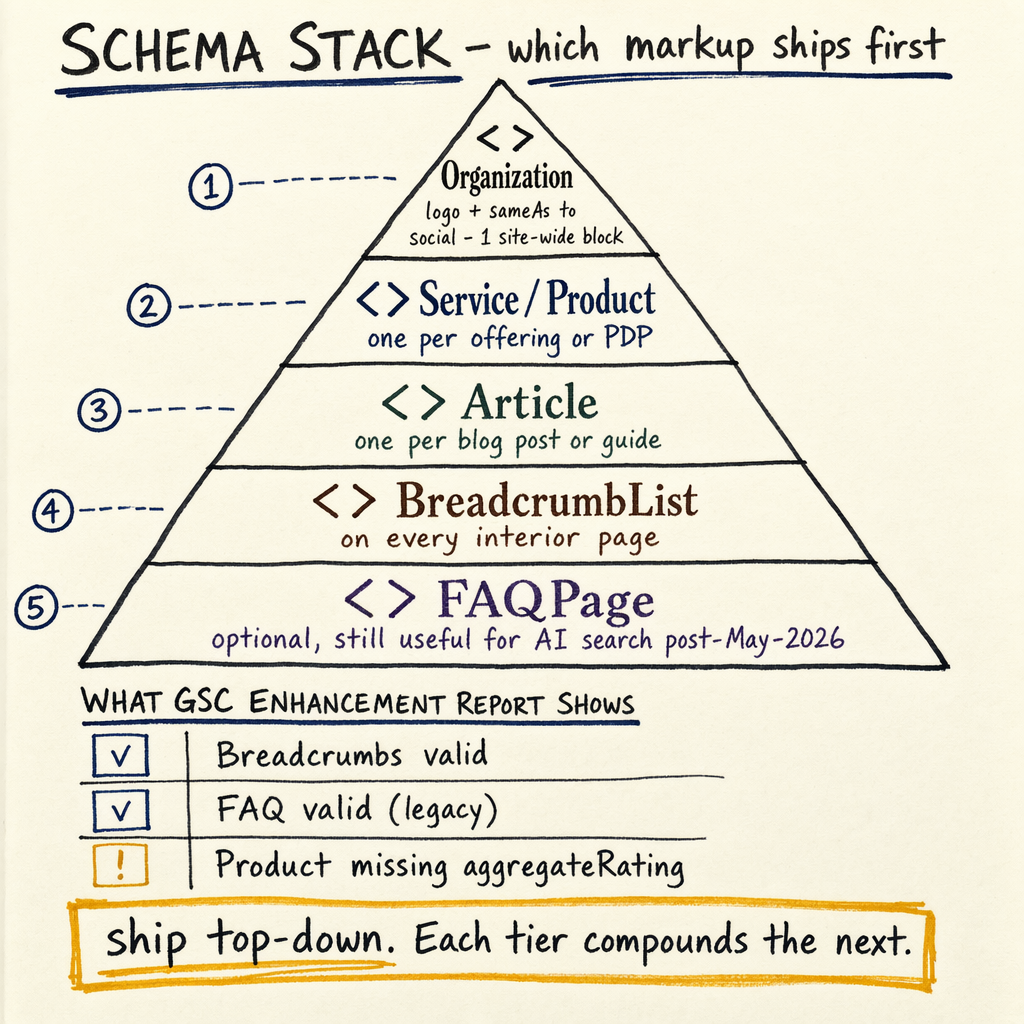
7,950 organic clicks/month is what the enzymes.bio audit was already producing, but the site still had a 1.4% CTR and 16,100 indexed pages fighting 591,000 not indexed. The question is not “should you add schema?” It is which schema to use for which page, and where JSON-LD actually changes search appearance.
Schema types that matter
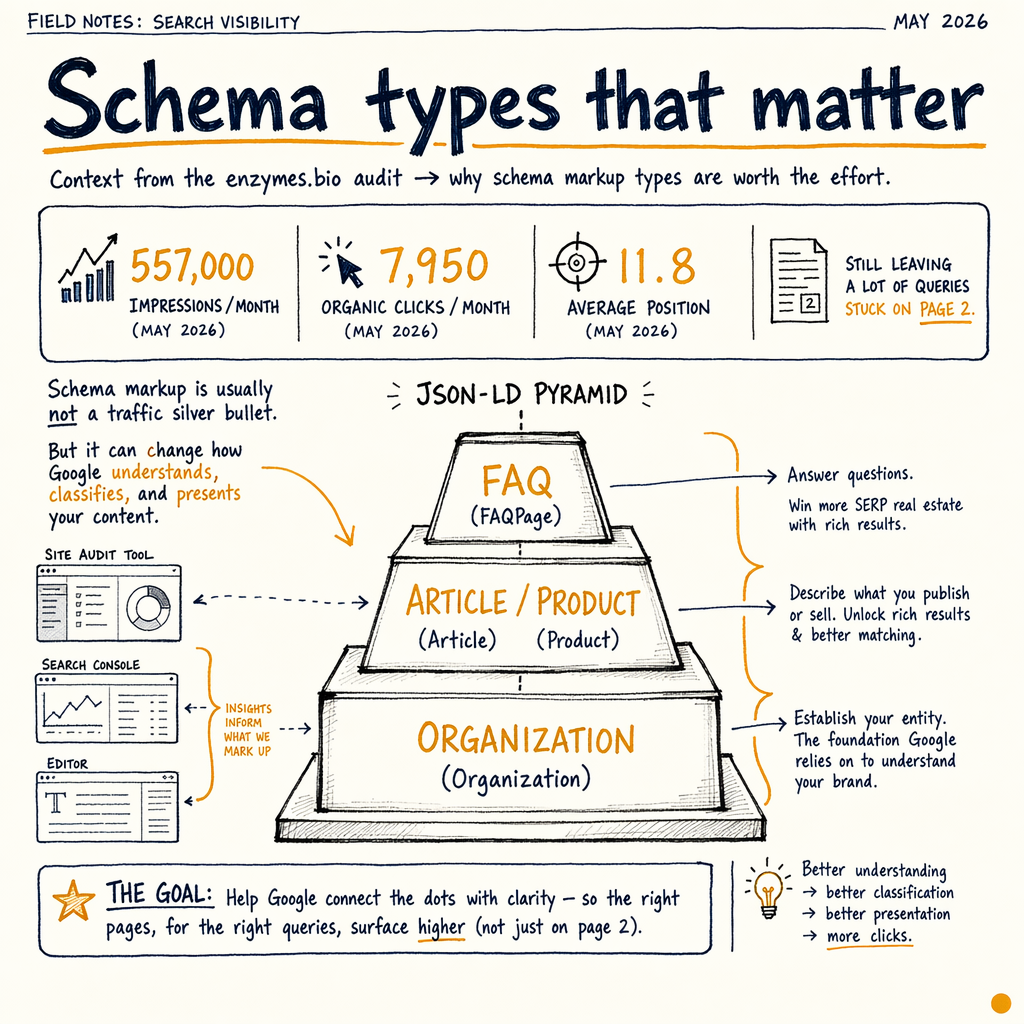
The enzymes.bio audit had 557,000 impressions/month, 7,950 organic clicks/month in May 2026, and an average position of 11.8 that still left a lot of queries stuck on page 2. That is the right context for schema markup types: it is usually not a traffic silver bullet, but it can change how Google understands page intent, entity relationships, and eligibility for enhanced search features.
Start with the page job, not the schema label. A product page needs Product, often with Offer, and sometimes AggregateRating if the data is real and visible. A content page may need Article, FAQPage, or BreadcrumbList. A local page may need LocalBusiness or Service. A company page often needs Organization. If the page type is wrong, JSON-LD can still validate and still be useless.
This page is written for JSON-LD only. That means one compact block in the <head> or body, not Microdata spread through HTML, and not RDFa. If you need implementation help, schema markup implementation is the service-page entry point, and schema validator is the quick check before you ship.
Schema types that matter
Product
Use on a real product detail page. Pair with Offer and a correct priceCurrency. On ecommerce, this is usually the highest-value schema markup type because it maps directly to transaction intent.
Article
Use on editorial content, guides, and news-like pages. Keep author, datePublished, and dateModified consistent with visible page content. Do not mark up an article if the page is mostly a landing page.
FAQPage
Use only when the page visibly shows a true question-and-answer section. If the answers are hidden behind tabs, accordions, or injected after load, make sure Google can render them and the content is still on page.
BreadcrumbList
Use on nearly every indexable page that has a real hierarchy. It helps Google understand site structure and may replace messy URL paths with cleaner result display.
Organization
Use on the brand or company entity page, often sitewide in a single global block. Add logo, sameAs, and legal name only if those values are stable and published.
Service
Use for service pages that sell expertise, not physical goods. This matters on pages like /services/technical-seo-audit/ where the page promise is the service itself, not a product SKU.
LocalBusiness
Use when there is a real local presence, address, and service area. If the business is remote-only, Organization plus relevant service schema may be cleaner than forcing a local entity.
VideoObject
Use when the page contains a real embedded video with a thumbnail, duration, and upload date. Video schema is often underused because people mark up embeds that are not central to the page.
Recipe
Use only for recipe content with ingredients, instructions, time, and nutrition where relevant. If the page is a thin listicle with a recipe mention, skip it.
Event
Use for time-bound events with a date, venue, and attendance model that is still factual at crawl time. Expired events should be removed or updated, not left to rot.
Decision tree by page type
- 01
Identify the page job
Ask one question: what does this page exist to do? Sell a product, explain a topic, capture a lead, announce an event, or represent the company. That answer determines the primary schema markup type before you touch JSON-LD. For example, a category page may need
BreadcrumbListandItemList, while a product detail page needsProductfirst. - 02
Match visible content
Only mark up content that is visible or clearly rendered to the user. If the page shows a price, include it in
Offer. If the page shows FAQs, includeFAQPage. If the page has a title, author, and date,Articleis usually safe. Google is much happier with schema that mirrors the DOM than schema that guesses. - 03
Choose one primary entity
Most pages need one main entity plus supporting schema. A service page can use
Serviceas the primary entity andBreadcrumbListas support. A homepage can useOrganizationas the primary entity andWebSiteorBreadcrumbListas support. Do not dump every type onto one page just because the validator accepts it. - 04
Add nested properties, not duplicates
Use nested objects when the data belongs together. For a
Product, nestOffer. For anArticle, addauthorandpublisher. For aBreadcrumbList, add orderedListItementries. This keeps the graph tighter and reduces conflicting entities across templates. - 05
Validate with the right tools
Run the markup through the schema validator, then check Google’s Rich Results Test, then confirm the page in
Indexing › PagesandPerformance › Search resultsafter rollout. Schema is not “done” until Google has crawled it and the page has had time to react.
Core schema types
| Page type | Primary schema | Usually add | Avoid |
|---|---|---|---|
Product detail |
|
|
|
Blog post |
|
|
|
FAQ page |
|
|
|
Service page |
|
|
|
Homepage |
|
|
|
Location page |
|
| Generic |
Video page |
|
| Marking up a player embed that is not the page focus |
Recipe page |
|
|
|
Event page |
|
| Leaving expired dates in place |
Ecommerce and service pages
For ecommerce, the default answer to which schema to use is usually Product. That does not mean every category page needs product markup, or that a filtered collection page should pretend to be a product page. On the enzymes.bio audit, the site had 16,100 indexed pages and 591,000 not indexed. In a setup like that, schema needs to be selective because Google already has more URLs than it can comfortably process.
For service businesses, Service is the cleanest starting point when the page is about a deliverable rather than a physical item. A technical SEO audit page, a migration page, or a schema implementation page should describe the service, the provider, and the business context. If there is a local office and the page is location-specific, add LocalBusiness on the location entity page, not everywhere.
The enzymes.bio audit also showed 0 external backlinks, which makes page intent and internal consistency more important. Schema does not replace links. It helps Google interpret the pages you already have. That is why BreadcrumbList, Organization, and Service are useful on service sites: they improve entity clarity without pretending to be something they are not.
If you want the ecommerce angle, read product schema for ecommerce. For FAQ-heavy pages, FAQ schema implementation is the narrower playbook.
JSON-LD examples
{
  "@context": "https://schema.org",
  "@type": "Product",
  "name": "Noise-cancelling headphones",
  "image": ["https://example.com/photos/1x1/photo.jpg"],
  "description": "Wireless headphones with active noise cancellation.",
  "sku": "NC-1024",
  "brand": {
    "@type": "Brand",
    "name": "ExampleAudio"
  },
  "offers": {
    "@type": "Offer",
    "url": "https://example.com/products/noise-cancelling-headphones",
    "priceCurrency": "USD",
    "price": "299.00",
    "availability": "https://schema.org/InStock"
  }
}

{
  "@context": "https://schema.org",
  "@type": "Article",
  "headline": "How to choose schema markup types",
  "author": {
    "@type": "Person",
    "name": "Mike"
  },
  "datePublished": "2026-05-01",
  "dateModified": "2026-05-22",
  "mainEntityOfPage": "https://example.com/learn/schema-markup-types"
}

{
  "@context": "https://schema.org",
  "@type": "FAQPage",
  "mainEntity": [
    {
      "@type": "Question",
      "name": "Which schema should I use on a product page?",
      "acceptedAnswer": {
        "@type": "Answer",
        "text": "Use Product, usually with Offer and BreadcrumbList."
      }
    }
  ]
}

{
  "@context": "https://schema.org",
  "@type": "BreadcrumbList",
  "itemListElement": [
    {
      "@type": "ListItem",
      "position": 1,
      "name": "Learn",
      "item": "https://example.com/learn/"
    },
    {
      "@type": "ListItem",
      "position": 2,
      "name": "Schema markup types",
      "item": "https://example.com/learn/schema-markup-types/"
    }
  ]
}

{
  "@context": "https://schema.org",
  "@type": "Organization",
  "name": "Example Co",
  "url": "https://example.com/",
  "logo": "https://example.com/logo.png",
  "sameAs": [
    "https://www.linkedin.com/company/example"
  ]
}
Validation workflow
curl -s 'https://validator.schema.org/#url=https://example.com/learn/schema-markup-types' \
  -H 'Accept: text/html'

# Rich Results Test is the first pass for eligible result types.
# Then compare the rendered DOM in DevTools.

# In Chrome DevTools:
# 1. Open the page
# 2. Inspect the <script type="application/ld+json"> block
# 3. Confirm the rendered text matches the JSON-LD fields
# 4. Re-run after deploy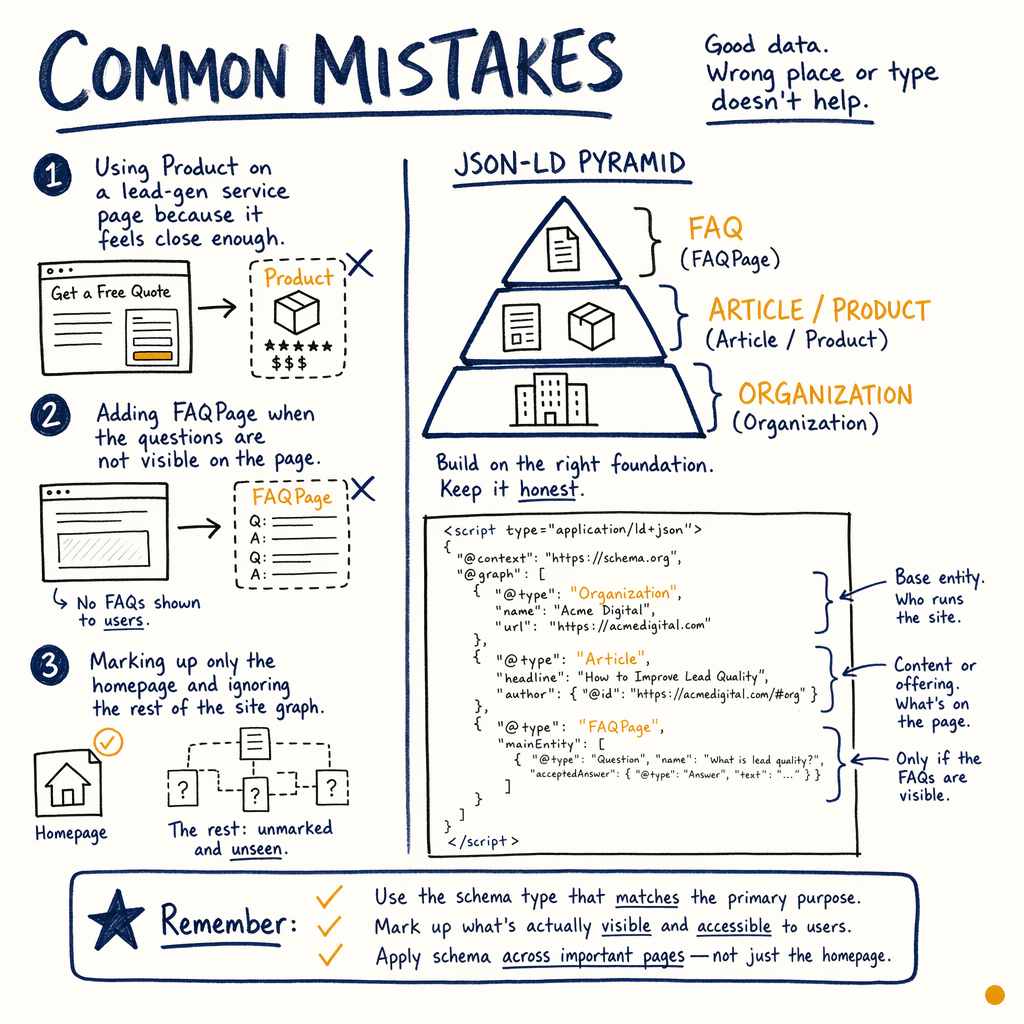
Common mistakes
- ✓
Using
Producton a lead-gen service page because it feels close enough. - ✓
Adding
FAQPagewhen the questions are not visible on the page. - ✓
Marking up only the homepage and ignoring the rest of the site graph.
- ✓
Copying a plugin preset without checking whether the page is an article, service, or product.
- ✓
Using multiple conflicting main entities on one URL.
- ✓
Leaving stale
Eventdates or outdated price values in the JSON-LD. - ✓
Expecting schema to fix thin content, crawl issues, or a zero-link profile like the enzymes.bio audit’s
0 external backlinks.
FAQ
Which schema markup types should I use first?
Start with the page’s primary job. For most sites that means Organization on the brand entity, BreadcrumbList sitewide, then Product, Article, Service, FAQPage, or LocalBusiness depending on the page. If you need a shortcut, validate the page in the schema validator and compare it with Google’s Rich Results Test.
Do I need every schema type on one page?
No. More types is not better. One main entity plus supporting markup is usually enough. A product page often needs Product and BreadcrumbList, while a blog post needs Article and BreadcrumbList. Adding unrelated types creates noise, not clarity.
What is the difference between schema.org types and rich results schemas?
schema.org is the vocabulary. Rich results are Google’s eligible presentation formats. Some schema types map directly to rich results, like Product or FAQPage, while others mainly improve entity understanding and context.
Should I use Microdata or JSON-LD?
Use JSON-LD. It is easier to maintain, easier to template, and less brittle during theme changes. It also keeps the markup separate from the visible HTML, which makes audits and QA faster.
Can schema increase clicks without moving rankings?
Yes, sometimes. On a page already averaging position 11.8, a clearer result template or richer snippet can improve CTR. That is especially useful when the site already has 557,000 impressions/mo but only 1.4% sitewide CTR.
How do I know which pages are worth the effort?
Prioritize pages with high impressions, high commercial value, or unstable search appearance. In GSC, start in Performance › Search results, then cross-check template groups in Indexing › Pages and Enhancements › Product snippets, Enhancements › FAQ, or Enhancements › Breadcrumbs.