Google Search Console Guide: Every Report Explained
**7,950 organic clicks/mo, 557,000 impressions/mo, and a 1.4% CTR tell you more than any vanity dashboard.** This GSC tutorial walks report-by-report through what to read, what to ignore, and what to fix first.
What GSC shows first
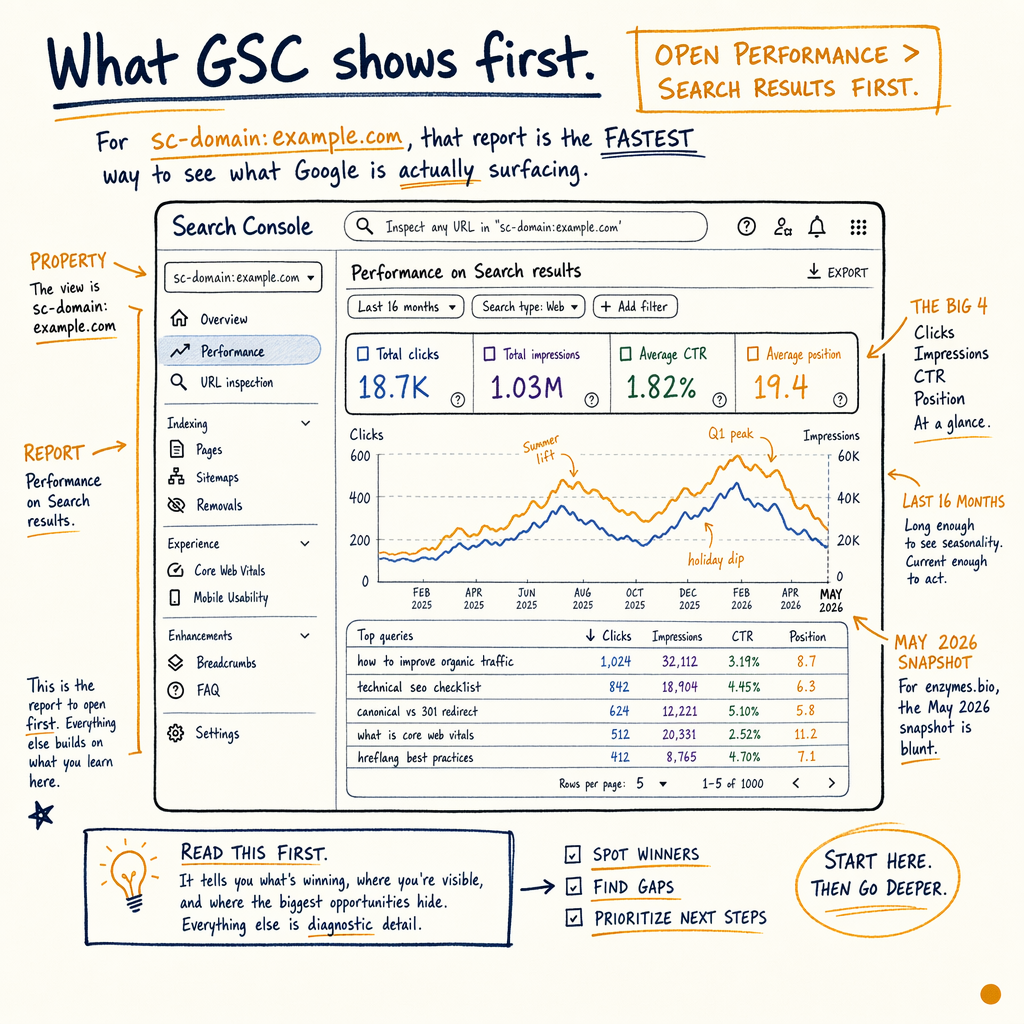
Open Performance › Search results first. For a sc-domain:example.com property, that report is the fastest way to see what Google is actually surfacing: Total clicks, Total impressions, Average CTR, and Average position across the Last 16 months window.
For enzymes.bio, the May 2026 snapshot is blunt: 7,950 organic clicks/mo, 557,000 impressions/mo, 1.4% sitewide CTR, and avg position 11.8. That is not a content problem alone. It is a query-mix problem, a snippet problem, and a ranking distribution problem.
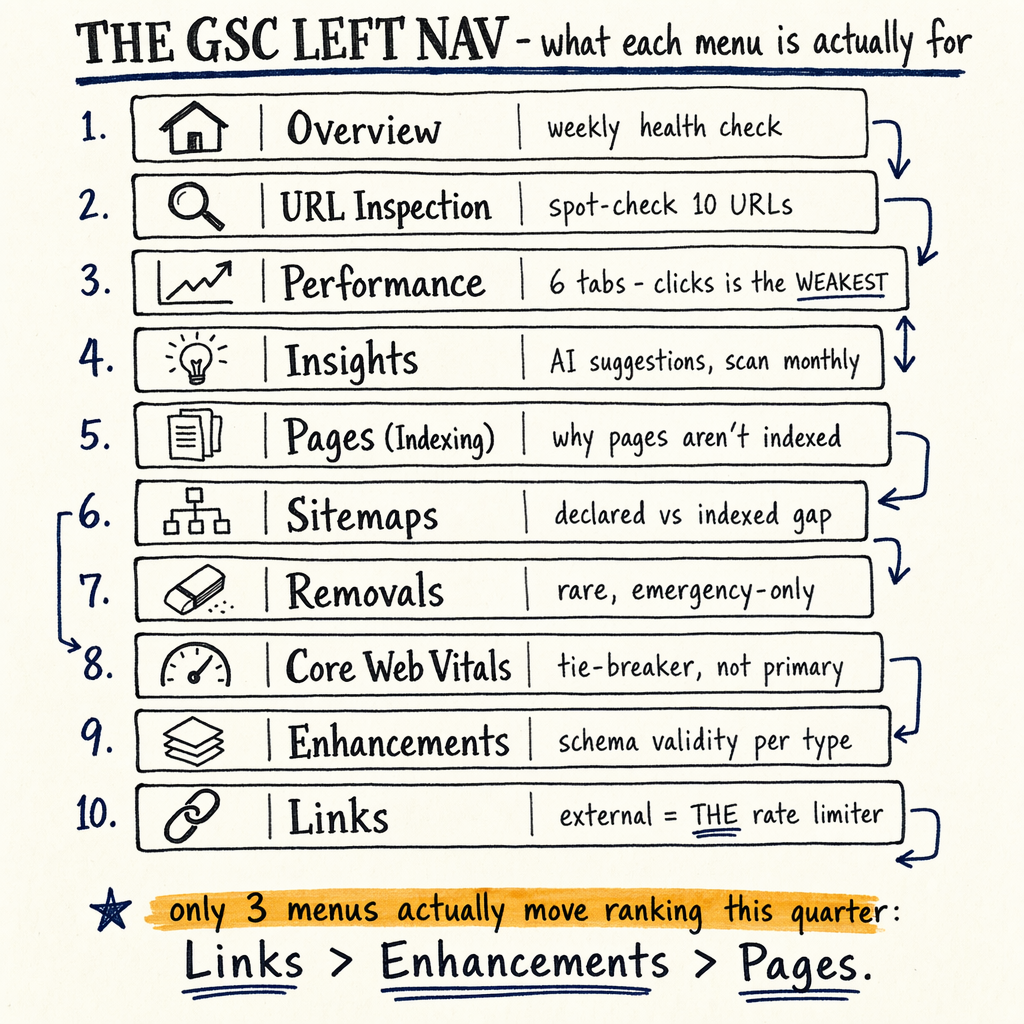
If you want the short version of how to use search console, treat every screen as a question. Performance › Search results asks: what gets shown and clicked? Indexing › Pages asks: what is in the index and why not? Settings › Crawl stats asks: can Googlebot fetch enough pages fast enough?
Performance report
Total clicks
Use this as the outcome metric, not the strategy metric. On enzymes.bio, Total clicks reached 7,950/mo in May 2026, up from 2,770 in May 2025. That +187% change matters because it came from the same property, not a new channel.
Total impressions
Impressions tell you how often Google is willing to show your pages. At 557,000/mo, the property has plenty of search demand exposure, but the 1.4% CTR says the SERP packaging is weak for many queries.
Average CTR
CTR is the bridge between ranking and traffic. If a page sits at position 8 to 14, a bad title tag or mismatched intent can cut clicks in half even when impressions stay flat.
Average position
Position 12.4 sitewide, or 11.8 in May 2026, is classic "almost page one" territory. That is where title rewrites, internal links, and intent cleanup usually move the needle faster than publishing more pages.
Read the charts correctly
The four chart metrics are easy to misread. Total clicks can rise while Average position falls if long-tail queries grow faster than top-10 keywords. Total impressions can spike after a new page gets indexed even if clicks stay flat. That is normal.
Use the filters above the chart to split the data by Search type, Date, Page, Query, Country, and Device. Then compare pairs. If desktop CTR is 2.1% and mobile CTR is 0.8%, the issue is usually snippet truncation, intent mismatch, or a bad mobile SERP presentation.
The Last 16 months view matters because short windows hide seasonality. A single weekly uplift can be noise. A 6-month slope that turns up after an indexation fix is evidence.
Indexing reports
| Field | Option A | Option B |
|---|---|---|
Indexing › Pages | 16,100 indexed pages | 591,000 not indexed |
What it means | Google can serve these URLs | Google is excluding these URLs for a reason |
First question | Are the indexed URLs the right ones? | Why are the excluded URLs excluded? |
Useful status |
|
|
Best follow-up | Check canonicals and internal links |
Fix indexing drift
The enzymes.bio audit shows 16,100 indexed pages and 591,000 not indexed. That ratio is not automatically bad on a multilingual ecommerce site, but it is a warning that Google is spending crawl and index attention on a lot of URLs you probably do not want ranking.
Start in Indexing › Pages. Then sort the issue list by reason, not by panic. If you see Duplicate, Google chose different canonical than user, verify internal canonicals, hreflang logic, and parameter handling. If you see Discovered - currently not indexed, the problem is usually crawl prioritization, not a technical block.
If you need a reason-by-reason map of the common states, use Coverage report errors and then apply the fixes in indexing issues troubleshooting.
Inspect a URL
curl -I https://example.com/product/sample-page/

# Look for:
# HTTP/2 200
# x-robots-tag
# canonical hint in HTML
# location if redirected
Experience and snippets
The Experience › Core Web Vitals report does not rank pages by speed. It groups URLs into Good, Needs improvement, and Poor using field data. That matters because Google is measuring real users, not lab tests.
On the enhancement side, read Enhancements › Breadcrumbs, Enhancements › Product snippets, and Enhancements › FAQ as validation reports. They answer one question: did Google parse the structured data without errors? If the answer is no, fix the markup before you care about rich result gains.
For product pages, the audit should check whether the structured data matches visible content. For FAQs, only keep questions that are actually on-page. For breadcrumbs, make sure the hierarchy matches your internal link structure, not just your menu.
Product snippet schema
{
  "@context": "https://schema.org",
  "@type": "Product",
  "name": "Sample Product",
  "offers": {
    "@type": "Offer",
    "priceCurrency": "USD",
    "price": "24.00",
    "availability": "https://schema.org/InStock"
  }
}
Links and crawl stats
Links › External links
enzymes.bio has 0 external backlinks. That is the rate-limiter. When Google sees no external discovery or authority signals, every internal signal has to work harder. Links are not a vanity section here; they are a ranking constraint.
Links › Internal links
Use this to find orphaned or weakly linked pages. If a page has impressions but poor clicks, adding 3 to 5 relevant internal links can move it from position 12 to position 8 faster than publishing a new URL.
Settings › Crawl stats
This report shows Googlebot fetch volume, response time, and file type breakdown. If crawl requests drop while new URLs rise, you have a discovery bottleneck. If response times spike, your server or CDN is part of the problem.
First sprint actions
- 01
Pull the highest-opportunity queries
In
Performance › Search results, filterQueryto impressions above a practical floor and position between 4 and 20. Those are the terms where snippet changes or content refreshes can create clicks quickly. - 02
Map each query to one page
If one query drives several URLs, you likely have cannibalization or weak canonical signals. Consolidate the target page, then verify in
Indexing › Pagesand the URL inspection tool. - 03
Fix the no-index reasons
Sort the excluded URLs in
Indexing › Pagesby reason. Start withBlocked by robots.txt,Alternate page with proper canonical tag, andCrawled - currently not indexed. Those are usually the highest-volume issues. - 04
Validate rich results
Open
Enhancements › Breadcrumbs,Enhancements › Product snippets, andEnhancements › FAQ. Zero errors is the baseline. Warnings are only acceptable if the missing fields are intentionally absent. - 05
Check crawl capacity
In
Settings › Crawl stats, compare crawl activity to publishing volume. If Googlebot is fetching fewer HTML pages than before while the site grows, tighten internal linking and reduce low-value URL generation.
How to read filters
The most useful Performance › Search results habit is filtering before you react. Start with Page, then Query, then Country, then Device. That order usually exposes the smallest set of causes.
A good gsc tutorial answer is this: use one query, one page, one device segment, one country segment. If the numbers still look bad in that narrow slice, the problem is real. If they improve, the issue is probably mix, not quality.
For multilingual sites, watch language and country together. TranslatePress can create broad coverage, but broad coverage is not the same as good coverage. If 35 languages are live, GSC still needs clear canonicals, hreflang, and internal pathways so Google can choose the right URL.
FAQ
What is the first GSC report to open?
Open Performance › Search results first. It shows Total clicks, Total impressions, Average CTR, and Average position, which tell you what Google is already sending.
What does `sc-domain:example.com` mean?
It is a domain property pattern that rolls all subdomains and protocols into one view. Use it when you need one source of truth for the whole domain.
Why are indexed pages and not indexed pages both important?
Because index volume alone is not a win. On enzymes.bio, 16,100 indexed URLs versus 591,000 excluded URLs means the audit has to check whether Google is indexing the right pages.
How do I find quick CTR wins?
In Performance › Search results, filter queries with high impressions and positions between 4 and 15. Then rewrite titles and meta descriptions around the exact query intent. See improve CTR.
What if a page is valid but not ranking?
Valid only means Google can process it. Ranking still depends on intent match, internal links, external signals, and page quality. Indexing › Pages does not measure relevance.
Where does crawl rate live?
Go to Settings › Crawl stats. Compare fetch counts, response time, and file type mix before and after releases.
GSC audit checklist
- Performance › Search results: clicks, impressions, CTR, position

- Indexing › Pages: indexed, excluded, reason buckets

- Indexing › Sitemaps: submitted vs discovered URLs

- Experience › Core Web Vitals: Good / Needs improvement / Poor

- Enhancements › Breadcrumbs, Product snippets, FAQ: errors and warnings

- Links › External links: confirmation of the 0-backlink constraint

- Settings › Crawl stats: fetch rate, response time, file mix

- URL inspection: live test, canonical, indexing state
Where this guide fits
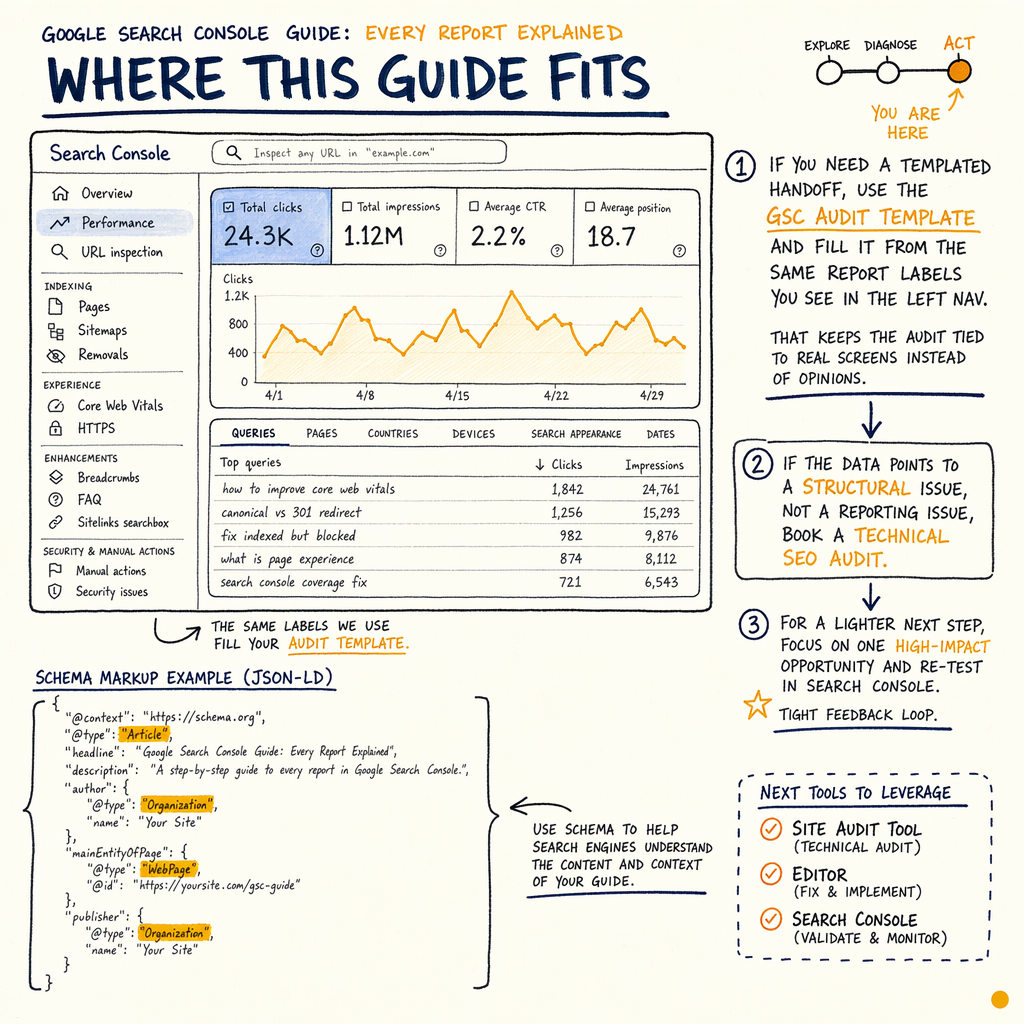
If you need a templated handoff, use the GSC audit template and fill it from the same report labels you see in the left nav. That keeps the audit tied to real screens instead of opinions.
If the data points to a structural issue, not a reporting issue, book a technical SEO audit. For a lighter next step, see all services or go straight to Request an audit.
The enzymes.bio numbers are a good benchmark for what the raw picture can look like: 7,950 clicks/mo, 557,000 impressions/mo, 1.4% CTR, 16,100 indexed pages, and 0 external backlinks. That is enough data to prioritize hard.