Site migration SEO for zero-loss moves
7,950 organic clicks/month, 557,000 impressions/month, and 16,100 indexed pages can still wobble hard on launch day. This service keeps domain moves, CMS swaps, and HTTPS changes inside a controlled envelope with redirect mapping, GSC verification, and rollback triggers.

Why migrations break
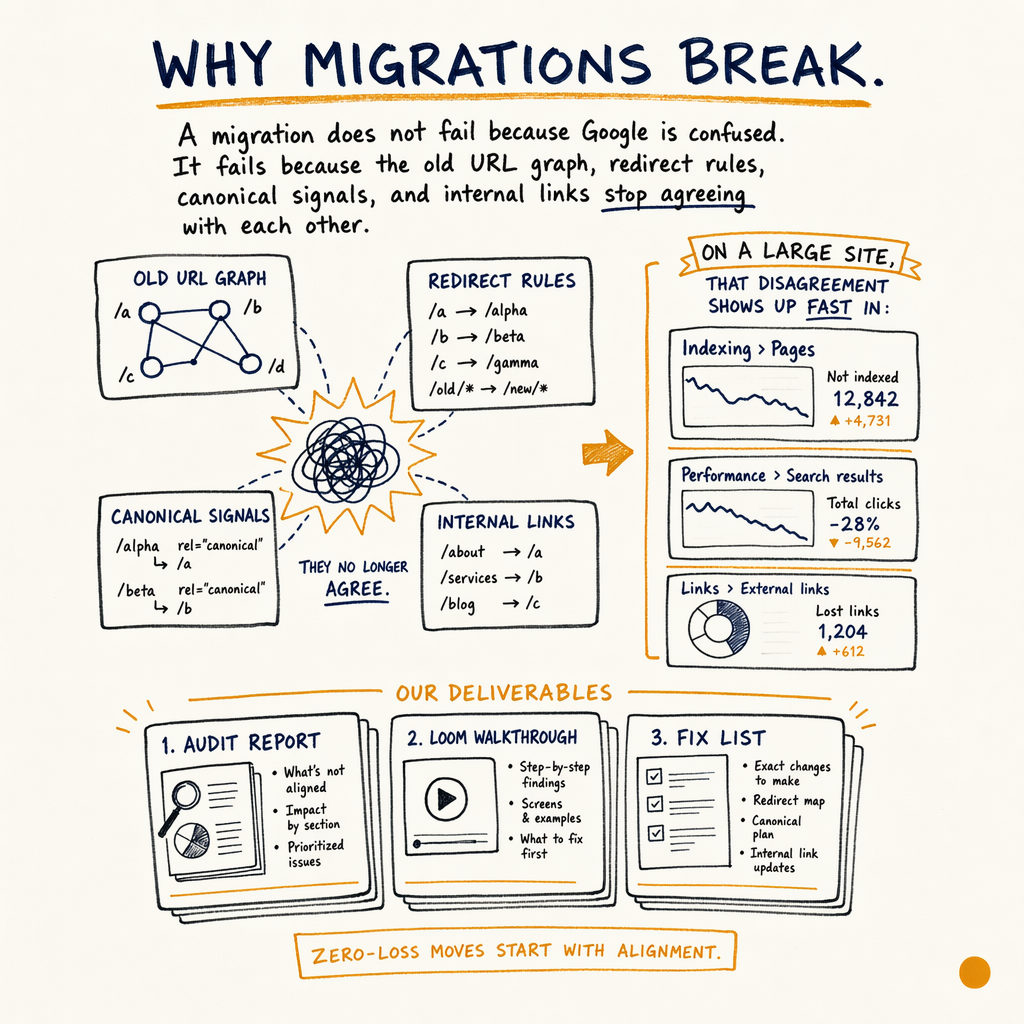
A migration does not fail because Google is confused. It fails because the old URL graph, redirect rules, canonical signals, and internal links stop agreeing with each other.
On a large site, that disagreement shows up fast in Indexing › Pages, Performance › Search results, and Links › External links. One bad move can turn a clean domain migration into a crawl spike, index bloat, and a 3- to 8-week traffic dip.
The enzymes.bio audit is a good benchmark for what a site should look like before a move, not after one: 7,950 organic clicks/month in May 2026, up from 2,770 in May 2025, 557,000 impressions/month, 1.4% CTR, and 16,100 indexed pages against 591,000 not indexed. The catch is the real rate-limiter: 0 external backlinks. When authority is thin, migration mistakes are harder to recover from.
If you are doing a domain migration SEO project, a CMS migration SEO handoff, or a pure HTTPS move, the work is the same at the core: preserve URL equity, keep indexation stable, and verify that Google sees the same page intent after launch.
What this service covers
Redirect mapping and QA
Every legacy URL gets a destination rule, status code check, and chain test. I validate 301 targets, kill loops, and confirm the final URL resolves in one hop. If a page changes format, I make sure the redirect lands on the closest equivalent, not just the homepage.
Canonical and index control
Canonical tags, noindex rules, parameter handling, and XML sitemaps get checked as one system. That matters for replatforming SEO, where duplicate variants often multiply on staging and then leak into production if the template logic is sloppy. See canonical handling.
Search Console setup
I use GSC as the source of truth. That means property validation, sitemap submission in Indexing › Sitemaps, inspection of Indexing › Pages, and live checks in Performance › Search results after launch. The audit is built around what Google reports, not what the CMS dashboard says.
Recovery planning
Before launch, I define the rollback conditions. If impressions collapse, coverage errors spike, or redirects fail at scale, the recovery plan kicks in. For moves that already lost traffic, the work shifts into ranking recovery mode.
Content and template parity
The migration only works if titles, headings, structured data, body copy, and internal links survive the move with the same intent. I check the high-value templates first, then the long tail. If the old site has 35 language variants through TranslatePress, that matrix gets tested separately.
Launch support
I do not hand over a spreadsheet and disappear. You get pre-launch QA, post-launch checks, and a short list of exact fixes if Google starts crawling the wrong things. That is the difference between a clean move and a mystery traffic dip.
Five-step process
- 01
Baseline the current site
I start with GSC, server logs if available, and a full URL inventory. The baseline records clicks, impressions, average position, indexed pages, non-indexed pages, top linked URLs, and top template groups. On a site like enzymes.bio, that means watching
7,950monthly clicks,557,000impressions, and16,100indexed pages as the pre-move truth. - 02
Build the redirect map
Every indexable old URL gets a destination. I group rules by pattern first, then fill the exceptions. This is where most migrations win or lose. A clean map prevents mass 404s, avoids 302 drift, and reduces redirect chains when the site launches with new slugs or a new CMS.
- 03
QA the staging build
I check template output, canonicals, hreflang if present, sitemap generation, robots rules, pagination, and the status code behavior of critical URLs. I also inspect
Experience › Core Web Vitalsand the enhancement reports, because a migration that ships broken schema or slower templates is still a migration with a search penalty. - 04
Launch and verify
At launch, I verify redirects, canonical targets, sitemap submission, crawl stats, and the first indexed response in GSC. I also compare pre-launch and post-launch
Performance › Search resultsby page type, country, and query group. If the site is moving domains, I watch the old and new properties in parallel. - 05
Stabilize and recover
After launch, I monitor for redirect misses, coverage changes, traffic loss on money pages, and indexation drift. If the move causes a measurable drop, the recovery plan uses the fastest path back: fix templates, repair rules, resubmit sitemaps, and tighten internal links. If needed, the engagement shifts into a paid recovery sprint from $5,000.
What gets mapped
| Field | What I check | Why it matters |
|---|---|---|
URL inventory | Old URLs, query variants, trailing slashes, mixed-case paths | Missing a single pattern can strand thousands of pages. |
Redirect type |
| Wrong status codes leak equity and confuse indexation. |
Canonical target | Self-referential, cross-domain, parameterized | Canonical mismatch can override your redirect strategy. |
Internal links | Nav, body, breadcrumbs, footer, related content | Links should point directly to the new URL, not the old one. |
Sitemaps | Fresh XML sitemap and removal of stale URLs | Sitemaps tell Google what changed and what to ignore. |
Structured data | Product, FAQ, Breadcrumb, and article markup | Template changes often break enhancement eligibility. |
Language and region |
| A 35-language site needs explicit locale testing. |
Analytics and GSC | Properties, annotations, segment baselines | Without baseline data, launch debugging turns into guesswork. |
Pre-launch checklist
- ✓
Export every indexable URL from the old site and the staging build.
- ✓
Map one destination per legacy URL; no placeholders, no homepage catch-alls.
- ✓
Test redirects for status code, hop count, and final canonical.
- ✓
Verify
Indexing › Sitemapshas the new XML sitemap and only the new sitemap. - ✓
Check
Indexing › Pagesfor accidentalnoindex, blocked resources, and soft 404 patterns. - ✓
Confirm
Enhancements › Breadcrumbs,Enhancements › Product snippets, andEnhancements › FAQstill validate on staging. - ✓
Compare template titles, H1s, canonicals, schema, and internal links page by page.
- ✓
Record baseline clicks, impressions, CTR, and average position in
Performance › Search results. - ✓
Review
Settings › Crawl statsfor crawl spikes or sudden drops after launch. - ✓
Prepare a rollback rule: if key pages lose visibility or redirects fail at scale, revert fast.
Redirect rule example
<!-- Example: old URL to new URL mapping logic -->
<link rel="canonical" href="https://www.example.com/new-product/" />

<!-- Example Nginx redirect -->
# old path
location = /old-product/ {
  return 301 https://www.example.com/new-product/;
}

# pattern redirect
rewrite ^/blog/(.*)$ https://www.example.com/articles/$1 permanent;

<!-- Example sitemap entry -->
<url>
  <loc>https://www.example.com/new-product/</loc>
  <lastmod>2026-05-22</lastmod>
</url>
Launch monitoring stack
The first 72 hours after launch are mostly pattern matching. I look for differences between what the crawl should see and what Google actually reports.
The stack is simple: GSC for index and query data, server logs for crawl paths, and a browser check for templates and rendering. In Settings › Crawl stats, I want to see crawl activity moving toward the new URLs instead of wasting requests on stale paths. In Indexing › Pages, I want the old pages to fall out in a controlled way, not in a random burst.
For sites with strong revenue dependence, I also track commercial pages by segment. On enzymes.bio, the lifetime numbers tell the stakes: 943 orders to date, $240,809 lifetime revenue, and $255 AOV. If a migration breaks the pages that earn that revenue, the cost is not abstract.
Migration outcomes
The old CMS used mixed pattern rules and generated duplicate slugs. I rebuilt the redirect map, tightened canonicals, and swapped internal links to the final URLs before cutover.
The site shipped with exact one-to-one redirects, fresh XML sitemaps, and schema QA on Product snippets. GSC stopped reporting orphaned legacy URLs within the first crawl cycle.
The move kept section-level templates intact, so title tags, breadcrumbs, and FAQ markup survived the rebuild. Recovery work focused on fixing a handful of bad rules, not rewriting the site.
Pricing and scope
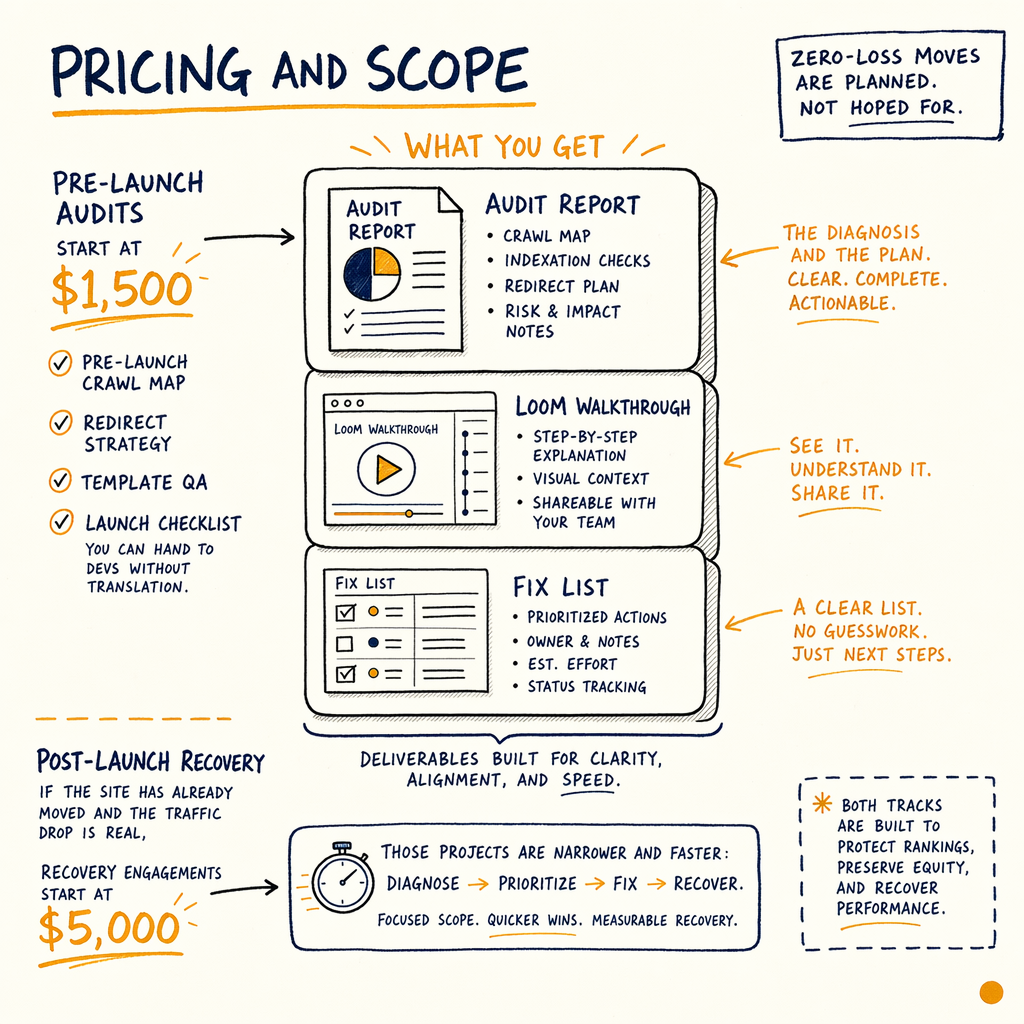
Audits start at $1,500. That covers the pre-launch crawl map, redirect strategy, template QA, and a launch checklist you can hand to devs without translation.
If the site has already moved and the traffic drop is real, recovery engagements start at $5,000. Those projects are narrower and faster: diagnose the failure mode, isolate the pages losing impressions, fix the cause, and stabilize the property in GSC.
A lot of migrations do not need a giant retainer. They need a website migration consultant who can tell the difference between a harmless crawl fluctuation and a structural SEO break.
FAQ
Do you handle domain migration SEO and CMS migration SEO together?
Yes. The same core controls apply: URL mapping, redirects, canonicals, sitemap updates, internal links, and GSC monitoring. The difference is the scale of the mapping and the likelihood of template-level breakage.
How early should a site migration SEO audit start?
Before the build is frozen. The best time is when the URL rules, information architecture, and redirect logic can still change. If you wait until launch week, you lose most of the leverage.
What do you check in GSC first?
Indexing › Pages, Indexing › Sitemaps, Performance › Search results, Links › External links, Settings › Crawl stats, and the relevant enhancement reports. That sequence shows whether Google can crawl, index, and rank the new site.
Do you support staged launches or partial migrations?
Yes, but they need stricter separation. Partial launches create mixed signals, so I segment by folder, subdomain, or locale and verify each move independently before expanding.
What if the old site has no backlinks?
Then redirects matter even more. On enzymes.bio, 0 external backlinks was the rate-limiter, so the move had to preserve existing search equity instead of relying on external authority to cushion mistakes.
Can you work from a Notion audit doc?
Yes. The deliverable is a Notion doc with findings, examples, risk level, and exact implementation notes for devs. That makes handoff easier than a PDF full of screenshots and vague priorities.