Fix soft 404 errors on WordPress
7,950 organic clicks/mo, 557,000 impressions/mo, and 16,100 indexed pages mean Google is already testing your WordPress site hard. If soft 404s are leaking through, the fix starts in `Indexing › Pages`, not in guesses.
What soft 404 means
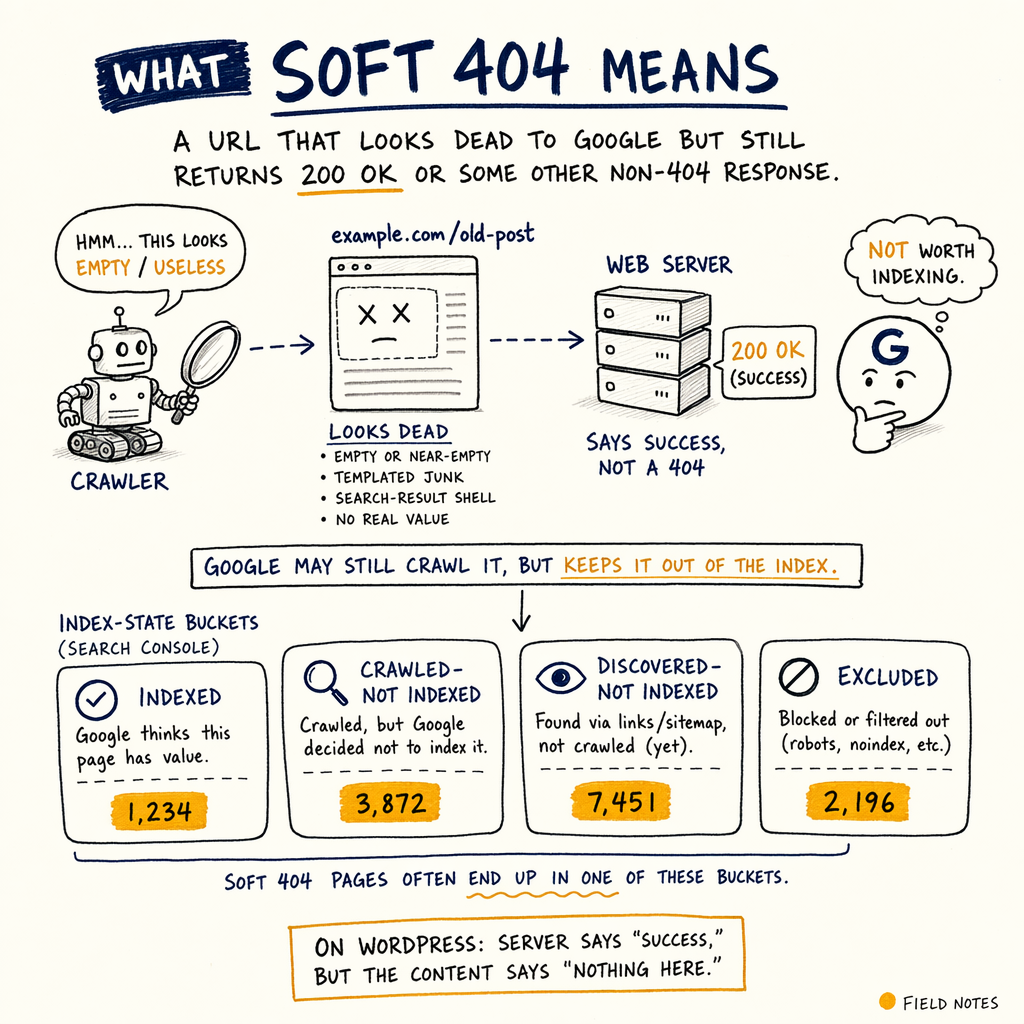
A soft 404 error is a URL that looks dead to Google but still returns 200 OK or some other non-404 response. The page may be empty, near-empty, templated junk, or a search-result-like shell with no real value.
On WordPress, the common pattern is simple: the server says “success,” but the content says “nothing here.” That mismatch is exactly why you see a gsc soft 404 signal instead of a clean indexable page.
The audit numbers on enzymes.bio make the scale obvious: 591,000 not indexed against 16,100 indexed pages. With 0 external backlinks, Google has no outside signal to compensate for weak templates or empty URLs. If a page is thin, duplicate, or functionally missing, Google often labels it a soft 404 rather than indexing garbage.
Find it in GSC
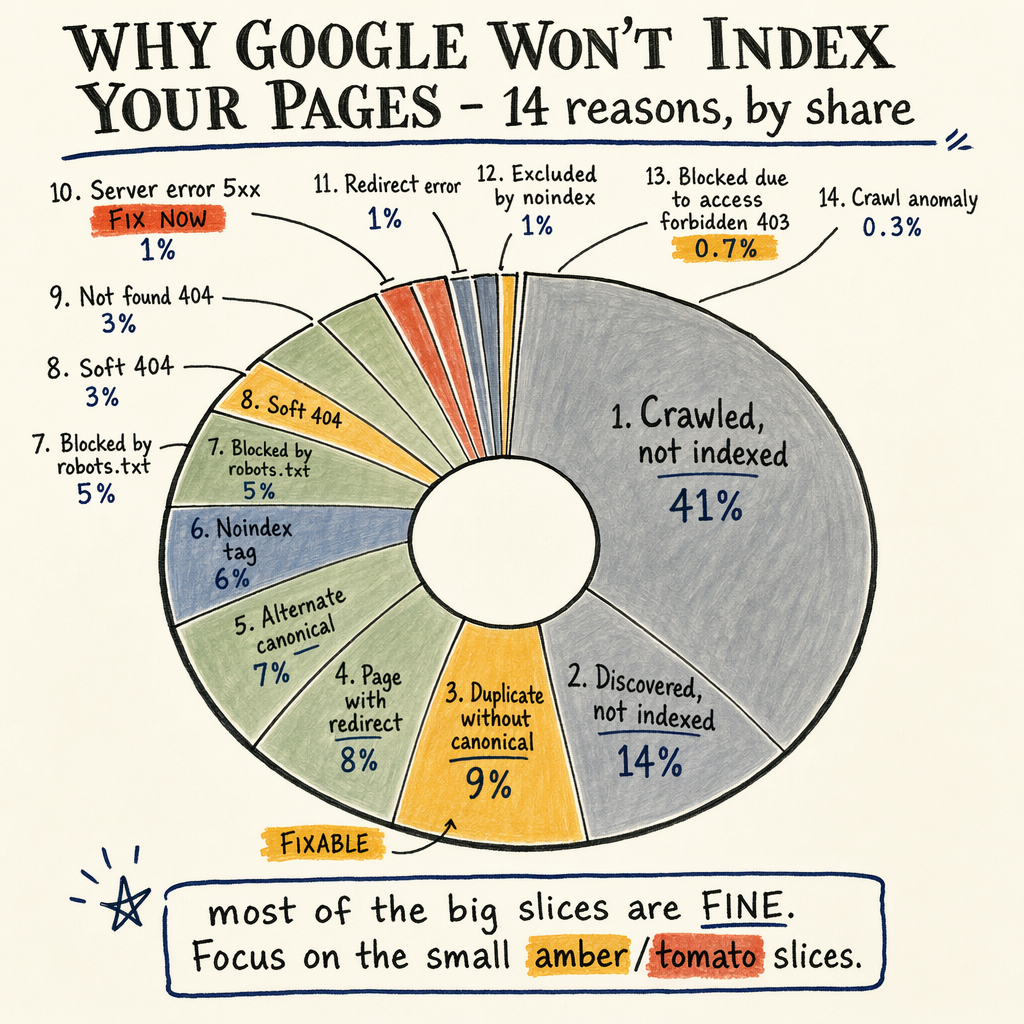
Start in Indexing › Pages. Walk the rows literally, because the row label matters more than the dashboard summary.
Look for:
Crawled - currently not indexedDiscovered - currently not indexedDuplicate, Google chose different canonical than userAlternate page with proper canonical tag
Crawled - currently not indexed before they ever become obvious sitewide. If the URL is crawled, returns 200, and has almost no unique content, Google can drop it without giving you a friendly error.
Use Performance › Search results to compare impressions and clicks on those URLs. If a page has impressions but no clicks, or clicks collapsed after a template change, you may be looking at a soft 404 pattern rather than a ranking issue. Cross-check Settings › Crawl stats for spikes in wasteful crawling.
See also indexing issue troubleshooting and Google Search Console coverage errors.
Why WordPress causes it
Empty custom post types
A CPT archive can return 200 OK while showing no meaningful entries, no intro copy, and no internal links. Google reads that as a thin page, especially when the URL is discoverable but not useful.
Empty taxonomy terms
Tag pages, category pages, and filtered archives often create thousands of near-duplicates. If a term has zero posts, the template still renders, so the page exists technically but fails editorially.
Broken search and filter pages
Internal search results, facet URLs, and parameter combinations can all return indexable HTML with no stable purpose. These are classic what is soft 404 examples on WordPress.
Theme templates that lie
Some themes output a polished header, sidebar, and footer even when the body is empty. That can keep the status at 200 while the main content area is effectively blank.
Fix the page source
The first sprint fix is to make dead pages honestly dead. If a URL has no real replacement and no search value, return 404 or 410. Do not keep a 200 status just because the theme is easier to render.
If the page should exist, add enough unique content to beat the thin-page threshold. That usually means a clear intro, crawlable body copy, internal links, and one job for the URL. Empty templates are not content.
For WordPress, the simplest code-level pattern is to block empty archives from looking like content pages.
Use the pattern below as a model, then test the actual response code with curl.
<?php
// functions.php
add_action('template_redirect', function () {
    if (is_category() || is_tag() || is_tax()) {
        global $wp_query;
        if ($wp_query->post_count === 0) {
            status_header(404);
            nocache_headers();
            include get_query_template('404');
            exit;
        }
    }
});
?>
Validate the response
curl -I https://example.com/category/empty-term/

# Good fix: real dead page
# HTTP/2 404

# Bad fix: soft 404 still leaking
# HTTP/2 200

curl -s https://example.com/category/empty-term/ | grep -iE 'no results|nothing found|page not found'
Handle taxonomy and archives
- 01
Audit all archives
List every category, tag, author, date, product, and custom taxonomy archive. Any archive with zero or near-zero value should be noindexed, redirected, or turned into a real landing page.
- 02
Kill empty term URLs
If a term has no posts, do not keep it indexable. Either remove internal links to it, send it to
404, or merge it into a parent topic with actual demand. - 03
Repair thin templates
Add unique intro copy, descriptive H1s, related links, and enough body text to make the page distinct. A template that only swaps the heading is not enough.
- 04
Check canonicals and robots
Make sure the canonical points to the strongest version, not the junk page. If the URL should never index, confirm
noindexis present and the page is not blocked before Google can see that directive.
Compare fix options
The right soft 404 fix depends on the URL’s purpose. A dead URL needs a dead response. A useful URL needs content. A duplicate URL needs consolidation.
| Field | Option A | Option B |
|---|---|---|
| Empty term archive | 404/410 | Noindex + keep live |
| Thin but valuable page | Expand content | Merge into stronger page |
| Duplicate filter URL | Canonicalize | noindex,follow |
| Internal search results | Block from index | Keep crawlable only |
If you need a broader indexing cleanup, pair this with discovered not indexed fixes and a deeper technical SEO audit.
Prevent repeat soft 404s
The long-term fix is template governance. If you run 35 languages via TranslatePress, every language URL needs the same quality bar. If translated terms, archives, or landing pages are empty, you multiply the problem across the site.
Tie the WordPress build to a simple rule set:
- If the URL has no search demand and no links, don’t index it.
- If the URL is meant to rank, give it unique copy, links, and a clear intent.
- If the URL is dead, return a dead status code.
- If the URL is a duplicate, consolidate it.
FAQ
What is soft 404?
It is a URL that returns a successful status, usually 200, but behaves like a missing page because the content is thin, empty, or irrelevant.
Why does WordPress create soft 404s?
WordPress makes it easy to publish archives, taxonomies, and filtered pages that exist technically but do not contain enough useful content.
How do I find soft 404s in GSC?
Open Indexing › Pages, then inspect Crawled - currently not indexed and Discovered - currently not indexed. Validate those URLs with curl -I.
Should a dead page return 404 or 410?
Either is fine. Use 404 for missing content and 410 when the URL is intentionally gone and should drop faster.
Can I fix soft 404s by adding noindex?
Sometimes, but only if the page is still useful to users or needs to stay live. If it is truly dead, a proper error status is cleaner.
Do soft 404s hurt crawl budget?
Yes. On a site with 16,100 indexed pages and 591,000 not indexed, Google wasting requests on junk URLs is a real rate-limiter.
Use the right signals
Cross-check the page status with Enhancements › Breadcrumbs, Enhancements › Product snippets, and Enhancements › FAQ. If structured data exists on a page that is otherwise empty, the page can still be soft-404ed.
Also inspect Links › External links. Enzymes.bio has 0 external backlinks, which means Google has almost no off-site trust signal to override a weak page. When the content is borderline, the status code and internal architecture do most of the work.
If you want this cleaned up systematically, see WordPress SEO services or request an audit. See all services.