SaaS SEO for product-led growth sites
7,950 organic clicks/mo and 557,000 impressions/mo usually means the problem is not demand. It is architecture: app routes, docs, blog, and marketing pages all competing for crawl, indexation, and internal links.
SaaS SEO symptoms
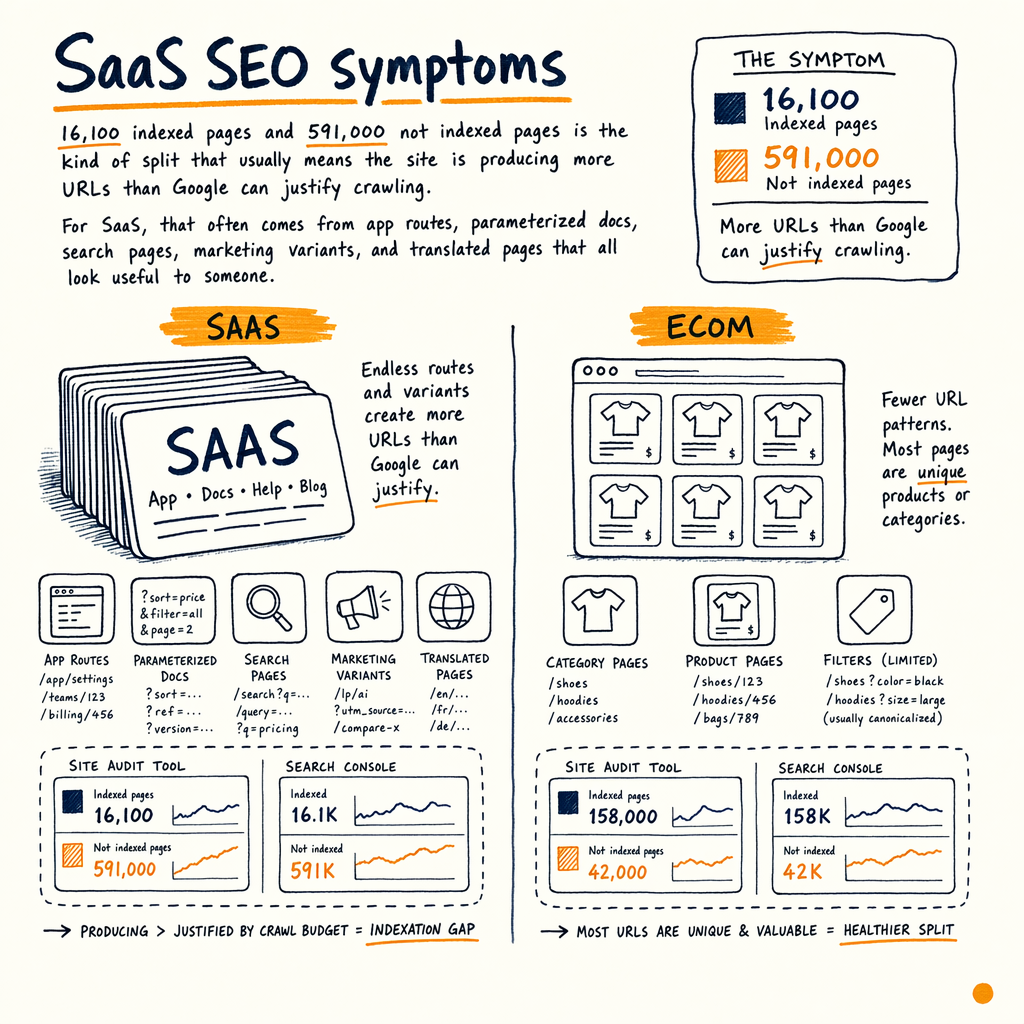
16,100 indexed pages and 591,000 not indexed pages is the kind of split that usually means the site is producing more URLs than Google can justify crawling. For SaaS, that often comes from app routes, parameterized docs, search pages, marketing variants, and translated pages that all look useful to a human but not distinct to Google.
That is the core problem in saas seo: the site grows in three directions at once. Product pages need rankings, docs need discoverability, and content needs top-of-funnel demand capture. If those sections share weak canonicals, messy templates, or inconsistent internal links, Google spends crawl budget on duplication instead of indexing the pages that can actually rank.
The audit numbers make the pattern obvious. 7,950 organic clicks/mo, 557,000 impressions/mo, 1.4% sitewide CTR, and average position 12.4 show there is plenty of search demand already. The limiter is not keyword volume. It is that Google sees too much low-value URL surface and too little page-level clarity.
For a b2b saas seo program, that means every template has to answer one question: should this URL be indexed, canonicalized, noindexed, or blocked at the source? If the answer is fuzzy, Google usually answers for you.
What GSC shows
Indexing › Pages mismatches
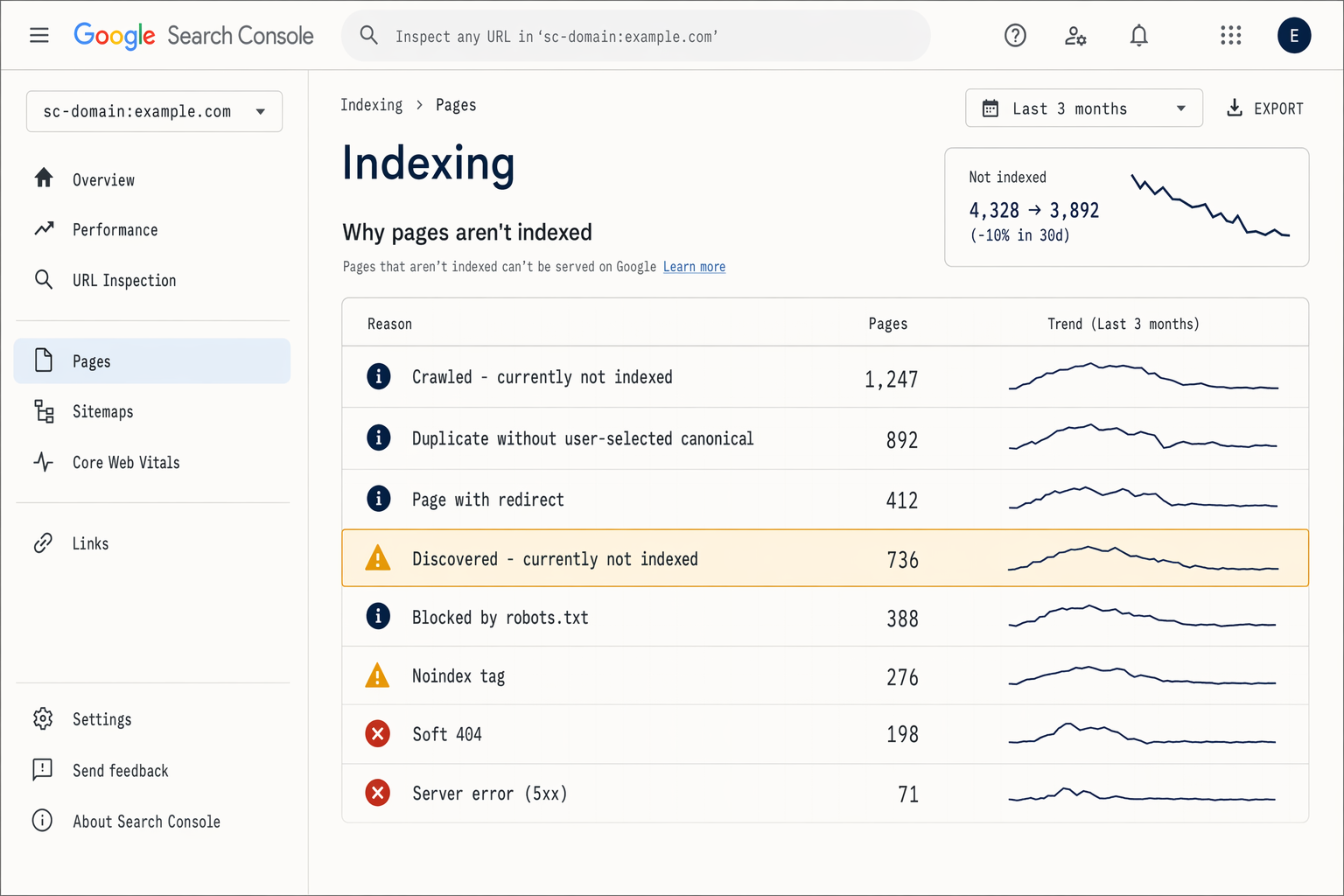
If Indexing › Pages shows large buckets like Crawled - currently not indexed, Duplicate without user-selected canonical, or Discovered - currently not indexed, the site is creating URLs faster than Google is trusting them. In SaaS, that is often docs filters, changelog archives, locale variants, and parameterized search.
Performance skew by template
In Performance › Search results, SaaS sites often look fine overall while individual templates are underperforming. A blog post may sit at position 8, while the product page for the same query languishes at position 21. That mismatch usually means internal linking and intent alignment are off.
Sitemaps with junk URLs
Indexing › Sitemaps is the easiest place to spot bad prioritization. If XML sitemaps include tag pages, thin docs, filtered views, or parameter URLs, you are telling Google to spend crawl on pages you do not want to defend.
Crawl stats pressure
Settings › Crawl stats can show whether Googlebot is burning requests on repetitive app paths, login flows, or infinite combinations of the same page. On large SaaS sites, a flat crawl rate with growing URL count usually predicts rising indexation debt.
External links as a rate limiter
Links › External links being at zero is not a footnote. It means the site has no off-site link equity to cushion weak architecture. If the crawl graph is messy, Google has no external signal telling it which sections matter first.
SaaS vs ecommerce
| Field | SaaS | Ecommerce |
|---|---|---|
Primary crawl risk | App routes, docs variants, translated pages | Facet combinations, variants, pagination |
Best ranking asset | Product page plus docs plus comparison page | Category page plus PDP |
Common GSC issue | Duplicate without canonical, Discovered not indexed | Alternate page with proper canonical, Crawled not indexed |
Internal-link job | Push authority into product and solution pages | Push authority into categories and filters |
Speed bottleneck | JavaScript rendering and hydration | Template bloat and image weight |
Architecture that scales
A SaaS site usually needs four different URL classes: marketing pages, product pages, docs, and app routes. If the template logic does not separate them cleanly, Google ends up treating them as one giant blur.
The simplest rule is this: every indexable URL must have one job, one canonical, one primary query cluster, and one internal-link path from the rest of the site. That is boring. It is also what keeps a site from turning into 700,000 near-duplicates.
This is where saas technical seo becomes architecture work, not content work. You are deciding what should live in the index, what should stay crawlable but excluded, and what should never be exposed to bots at all. Compare that with the technical SEO SaaS vs ecommerce breakdown if you want the template-level differences.
For a product-led site, the money pages are usually solution, use case, integration, pricing, and competitor pages. Docs support those pages, but docs should not cannibalize them. The blog can build discovery, but it should not become the only internal-link source for product URLs.
Canonical template
<link rel="canonical" href="https://example.com/pricing/" />
<meta name="robots" content="index,follow" />
<link rel="alternate" hreflang="en" href="https://example.com/pricing/" />
<link rel="alternate" hreflang="de" href="https://example.com/de/preise/" />
<link rel="alternate" hreflang="fr" href="https://example.com/fr/tarifs/" />

<!-- For translated docs, keep the canonical pointed at the language version, not the source page. -->
Rendering and indexation
A lot of SaaS sites ship critical copy through client-side JavaScript. That can work, but only if the rendered HTML contains the main content, headings, links, and canonical tags on first fetch. If the important bits arrive late, Google may index a shell instead of a page.
If you need the mechanics, read JavaScript SEO rendering and then compare it with dynamic rendering deprecation. The short version: do not depend on a second system to make your pages indexable.
For saas seo agency work, the test is simple. Open View Source, not just the rendered DOM, and verify that the title, H1, canonical, breadcrumb links, and primary body copy are present. Then check whether the same URL returns consistent HTML to Googlebot and normal browsers. If it does not, Indexing › Pages usually tells the truth later.
Sprint sequence
- 01
Map URL classes
List marketing, docs, blog, app, locale, and parameterized routes. Mark each as indexable, noindex, canonical-only, or blocked. This becomes the policy layer for the rest of the audit.
- 02
Check GSC patterns
Pull
Performance › Search results,Indexing › Pages,Indexing › Sitemaps,Links › External links, andSettings › Crawl stats. Look for page-type clusters, not sitewide averages. Averages hide the problem. - 03
Fix template signals
Standardize canonical tags, robots meta, breadcrumb markup, pagination handling, and hreflang. Make sure product pages, docs, and blog posts each emit a unique and stable signal set.
- 04
Trim crawl waste
Remove junk URLs from XML sitemaps, stop internal links to thin pages, and block low-value parameter patterns at the source. If a URL can never rank, it should not compete for crawl.
- 05
Rebuild internal links
Push links from blog posts, docs, and nav toward pages with commercial intent. Use anchor text that matches the target query cluster. If the target is pricing, link to pricing, not a generic homepage.
Crawl waste controls
- ✓
Exclude internal search URLs from XML sitemaps.
- ✓
Noindex thin tag pages, empty filters, and stale changelog archives.
- ✓
Canonical translated pages to their own language versions, not to the source language.
- ✓
Keep app-only routes out of crawl when they add no indexable value.
- ✓
Remove parameters from navigation links unless they create genuinely unique pages.
- ✓
Set a sitemap policy: only pages you want indexed should be submitted.
- ✓
Audit
Links › External linksand assume zero backlinks means no off-site safety net. - ✓
Check
Settings › Crawl statsafter release to see whether crawl waste rises.
Docs, blog, and app
SaaS content gets messy because each section has a different job. Docs answer implementation questions. The blog captures problem-aware search demand. The app converts logged-in users. If the architecture does not separate those jobs, internal links start fighting the conversion path.
A common failure mode is a docs article outranking the product page for a commercial query. Another is a blog post getting all the clicks while pricing and integrations pages sit in positions 15-30. In Performance › Search results, you will often see this as a template issue long before you see it as a keyword issue.
The fix is not to make everything “SEO-friendly” in the abstract. It is to design the site so the highest-value URLs are the easiest to discover, render, and trust. That usually means structured breadcrumbs, hub pages for use cases, and comparison pages that link toward the product. If you want a concrete example, see the client A SaaS migration case study.
GSC export check
curl -X POST https://searchconsole.googleapis.com/webmasters/v3/sites/https%3A%2F%2Fexample.com%2F/searchAnalytics/query \
  -H 'Authorization: Bearer $ACCESS_TOKEN' \
  -H 'Content-Type: application/json' \
  -d '{
    "startDate": "2026-05-01",
    "endDate": "2026-05-31",
    "dimensions": ["page", "query"],
    "rowLimit": 1000
  }'

# Then split results by template: /pricing/, /docs/, /blog/, /integrations/, /app/.FAQ
What is the main technical SEO issue in SaaS?
Usually it is not content volume. It is indexation control. SaaS sites generate many URL types, and Google needs clear signals about which ones are worth crawling, indexing, and ranking.
Why do SaaS sites get so many non-indexed pages?
Because app routes, docs variants, parameters, and translated pages create huge URL sets. If those pages are thin, duplicated, or poorly canonicalized, Google will leave them out of the index.
How should GSC be used for SaaS SEO?
Start with Indexing › Pages, Indexing › Sitemaps, Performance › Search results, Links › External links, and Settings › Crawl stats. That combination shows whether the issue is demand, discovery, or indexation.
Do SaaS companies need separate SEO tactics for docs and product pages?
Yes. Docs should support product discovery, not replace it. Product pages should own commercial queries, while docs should own implementation queries and related internal links.
When should a SaaS site noindex pages?
Noindex pages that are thin, duplicate, internally searched, or low-value at scale. If the page cannot rank for a meaningful query cluster, it should not be competing for indexation.
What does zero external backlinks mean?
It means Google gets no off-site authority signal to compensate for weak internal architecture. That makes clean technical signals even more important.
What the audit found
Clicks grew, CTR stayed low
7,950 organic clicks/mo in May 2026 was up from 2,770 in May 2025, a +187% increase. But 1.4% sitewide CTR and average position 11.8 in May 2026 show that many queries are still parked on page two.
Indexation was the bottleneck
16,100 indexed pages versus 591,000 not indexed is a scale problem, not a content problem. Google is seeing the site, but it is not choosing enough of the right URLs.
No backlink cushion
Zero external backlinks is the rate-limiter. When off-site authority is absent, internal architecture and clean rendering have to do more work per page.
Revenue already validates intent
943 orders to date and $240,809 lifetime revenue at a $255 AOV mean the commercial opportunity is real. Better technical control should convert existing impressions, not just create new traffic.