Fix Discovered Currently Not Indexed in GSC
7,950 organic clicks/month and 557,000 impressions/month still coexist with 591,000 not indexed URLs. If Google has discovered your page but not crawled it, the blocker is usually crawl priority, internal linking, or server-side drag.
What this status means
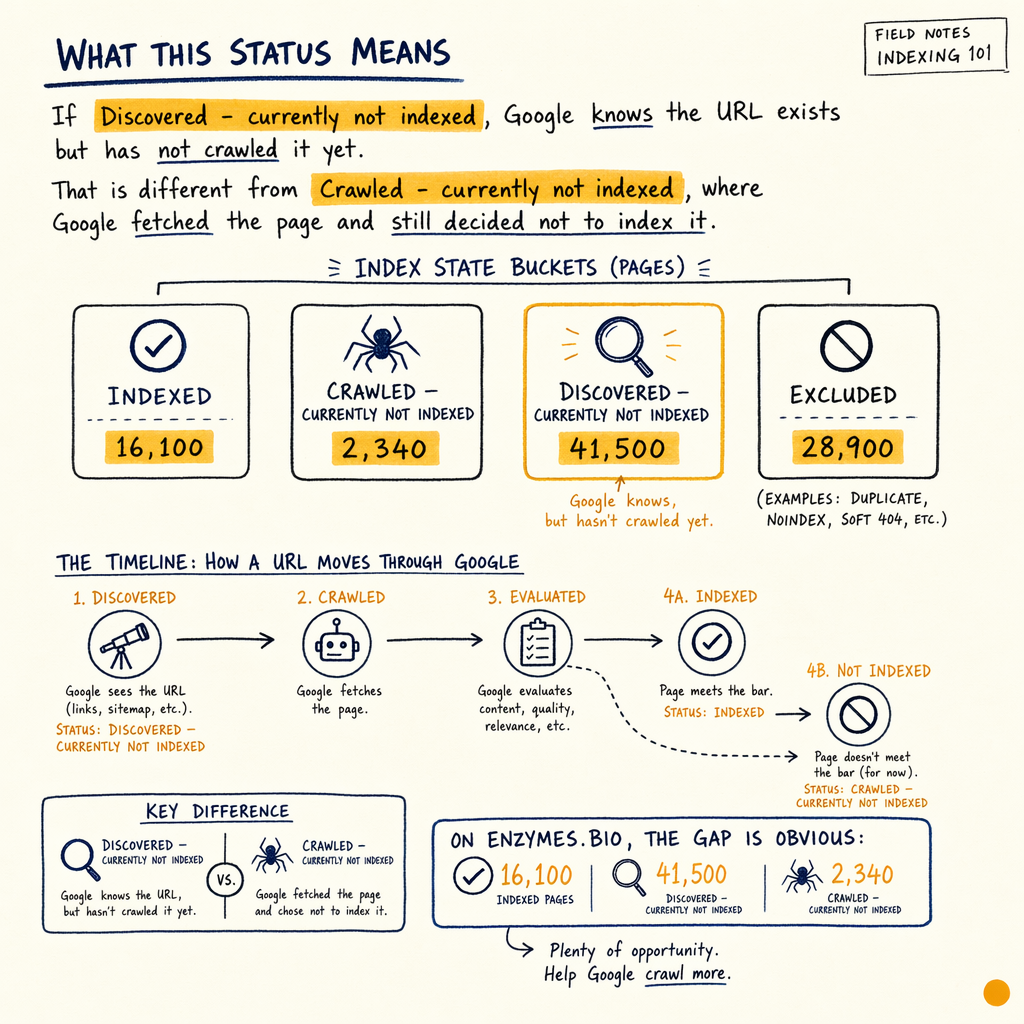
If Indexing › Pages shows Discovered - currently not indexed, Google knows the URL exists but has not crawled it yet. That is different from Crawled - currently not indexed, where Google fetched the page and still decided not to index it.
On enzymes.bio, the gap is obvious: 16,100 indexed pages and 591,000 not indexed. The site also has 0 external backlinks, so internal discovery signals matter more than usual. Google is not being "mysterious" here. It is prioritizing.
Your job is to make the target URL look cheaper to crawl, easier to trust, and more important than the rest of the queue.
Why Google stops here
Weak discovery signals
The URL exists, but few strong internal links point to it. If it is buried under faceted paths, parameter URLs, or orphan pages, Google may keep it in the discovered queue.
Low crawl priority
Google has finite attention per host. When a site has huge page counts, weak backlinks, and lots of similar templates, many URLs stay at Discovered - currently not indexed for weeks.
Server-side drag
Slow response times, intermittent 5xxs, or wasted crawl paths can keep Google cautious. Check Settings › Crawl stats before blaming content.
Thin or duplicate intent
Google often delays pages that do not clearly add new value. This is common on near-duplicate category pages, translated variants, and templated product pages.
Check the Pages report
Start in Indexing › Pages and walk the buckets verbatim: Discovered - currently not indexed, Crawled - currently not indexed, Excluded by 'noindex' tag, Page with redirect, and Duplicate, Google chose different canonical than user. Do not treat them the same.
For google discovered not indexed, compare the URL against Performance › Search results. If it has impressions but no clicks, the page may be known but underperforming. If it has zero impressions, Google may not even be surfacing it in relevant queries yet.
Use Google Search Console coverage report errors as the broader map, then isolate the specific bucket before you change anything.
Fix crawl priority
- 01
Find the URL type
Classify the page: money page, supporting content, filter page, translated page, or duplicate variant. If it is not a target page, do not spend crawl budget on it.
- 02
Add stronger internal links
Link from already-indexed pages that get impressions. Use descriptive anchors, not
click here. One strong in-body link often beats five sidebar links. - 03
Remove crawl traps
Prune parameter links, infinite faceting, and low-value archive paths. If Google keeps finding junk first, the good URLs wait.
- 04
Submit only the right URLs
Keep
Indexing › Sitemapsclean. Include canonical, indexable URLs only. If a sitemap contains dead ends, Google wastes early crawl on the wrong set.
Inspect a URL in DevTools
curl -I https://example.com/target-page/

curl -s https://example.com/target-page/ | head -n 40

# Check for response codes, canonical, and robots directives
# Then compare with Google-selected canonical in GSC
Reduce server drag
If Settings › Crawl stats shows response spikes, Google may slow its crawl rate. That turns a discovery problem into a queue problem. Fix the origin before you ask Google to revisit more URLs.
Check TTFB, 5xx bursts, and long response tails. On large sites, even a small slowdown can change how many URLs Google gets through per crawl cycle. If your server keeps wobbling, crawl budget optimization becomes a blocker, not a nice-to-have.
For sites with heavy rendering, also check Experience › Core Web Vitals. A page can be indexable and still expensive to process.
Discovered vs crawled
| Field | Discovered - currently not indexed | Crawled - currently not indexed |
|---|---|---|
Google status | Found, not fetched yet | Fetched, not indexed yet |
Usual cause | Low crawl priority or poor discovery | Thin content, duplication, or weak utility |
Best fix | Stronger internal links and cleaner sitemap | Improve content, canonical signals, and uniqueness |
Where to verify |
|
|
Use internal links better
Internal links are the fastest signal you control. Put the target URL near related pages that already rank, then make the anchor text match the page topic. If the page is important, it should not live three clicks deep behind a low-value hub.
For recovery work, I often pair this with indexing issues troubleshooting and crawled not indexed fixes. The first tells you whether the URL is blocked, canonicalized away, or simply delayed. The second tells you whether the content itself is the reason Google pauses.
Watch for false positives
Some pages should stay excluded. Filter URLs, alternate sort orders, internal search results, and thin language duplicates can all sit outside the index without hurting performance. The goal is not to index everything. It is to index the URLs that can earn clicks or support money pages.
At enzymes.bio, the commercial picture is clear: 943 orders to date, $240,809 lifetime revenue, and $255 AOV. That means a handful of pages can matter far more than thousands of low-value URLs. Focus on the pages that move revenue, not the pages that merely exist.
Run the recovery loop
- 01
Pick 20 URLs
Choose pages that should be indexable and already have a reason to rank. Avoid junk URLs and duplicates.
- 02
Fix the bottleneck
Tighten internal linking, clean the sitemap, or reduce crawl waste. If needed, address rendering and server latency first.
- 03
Inspect in GSC
Use URL Inspection, then compare the live test, canonical, and last crawl date. Look for movement out of
Discovered - currently not indexed. - 04
Measure the delta
Track impressions, indexed count, and crawl stats for 2-4 weeks. If the bucket count does not fall, the problem is still upstream.
Common questions
How do I fix discovered currently not indexed fast?
Start with the URL type, then improve internal links, sitemap quality, and crawl efficiency. If the page is still stuck, compare it with Crawled - currently not indexed to see whether quality is also involved.
Is discovered not indexed a penalty?
No. It is usually a prioritization issue, not a manual action. Google has found the URL but has not spent crawl resources on it yet.
Should I resubmit the sitemap?
Only after you remove junk URLs and confirm the sitemap contains canonical, indexable pages. Resubmitting a bad sitemap just tells Google to revisit the wrong set.
Why does Google discovered not indexed happen on big sites?
Big sites create more URLs than Google can process immediately. With 16,100 indexed pages, 591,000 not indexed, and 0 external backlinks, discovery has to be earned through structure and internal authority.
When should I escalate?
If your target URLs remain discovered for weeks, server stats are clean, and internal links are strong, move into ranking recovery. The issue may be broader than indexing alone.
Sample canonical check
{
  "url": "https://example.com/target-page/",
  "indexing_state": "Discovered - currently not indexed",
  "canonical": "https://example.com/target-page/",
  "robots": "index,follow",
  "last_crawl": null,
  "next_checks": [
    "internal links",
    "sitemap inclusion",
    "response time",
    "duplicate templates"
  ]
}