Fix Google Chose Different Canonical Than User
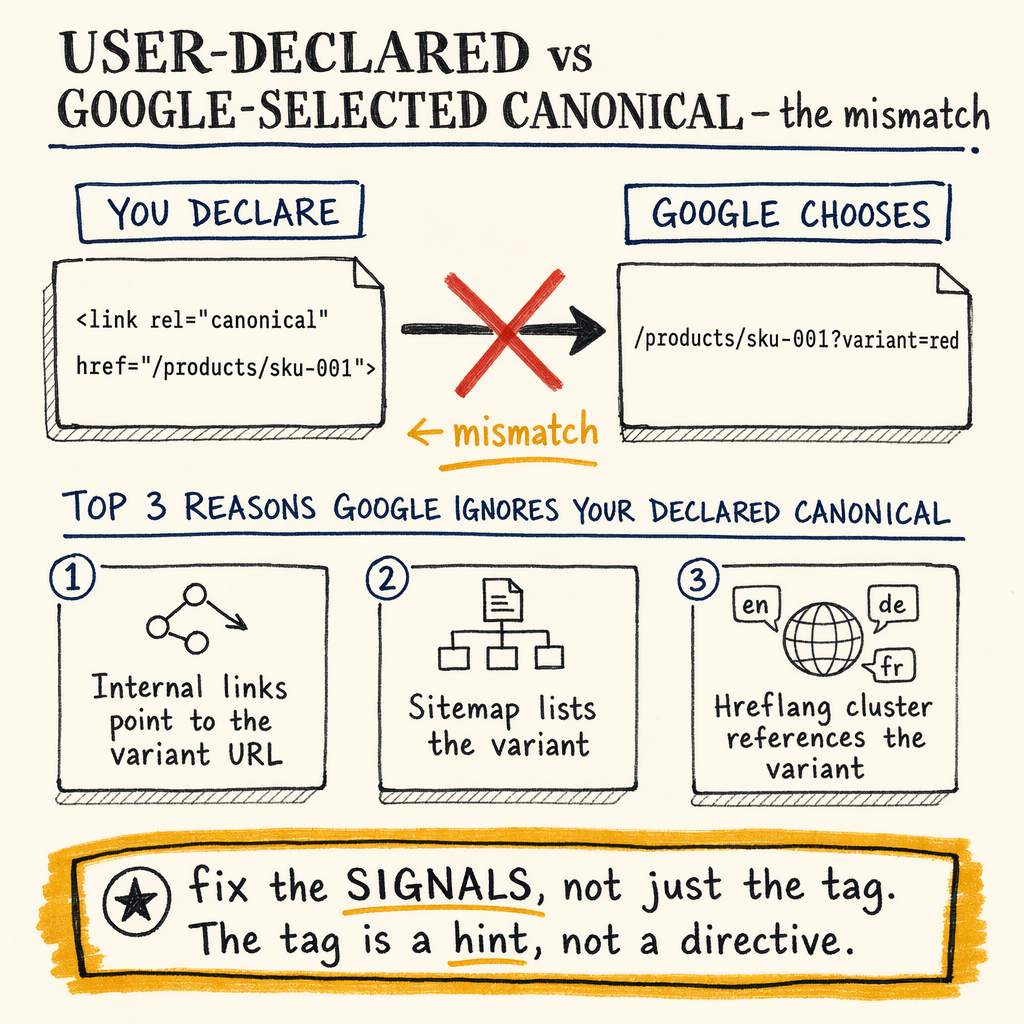
**Google can ignore your user-declared canonical when the page signals don’t agree.** In one crawl-heavy site, the rate-limiter was not content quality — it was 0 external backlinks, 16,100 indexed pages, and a mismatch between what the tag said and what URL Inspection selected.
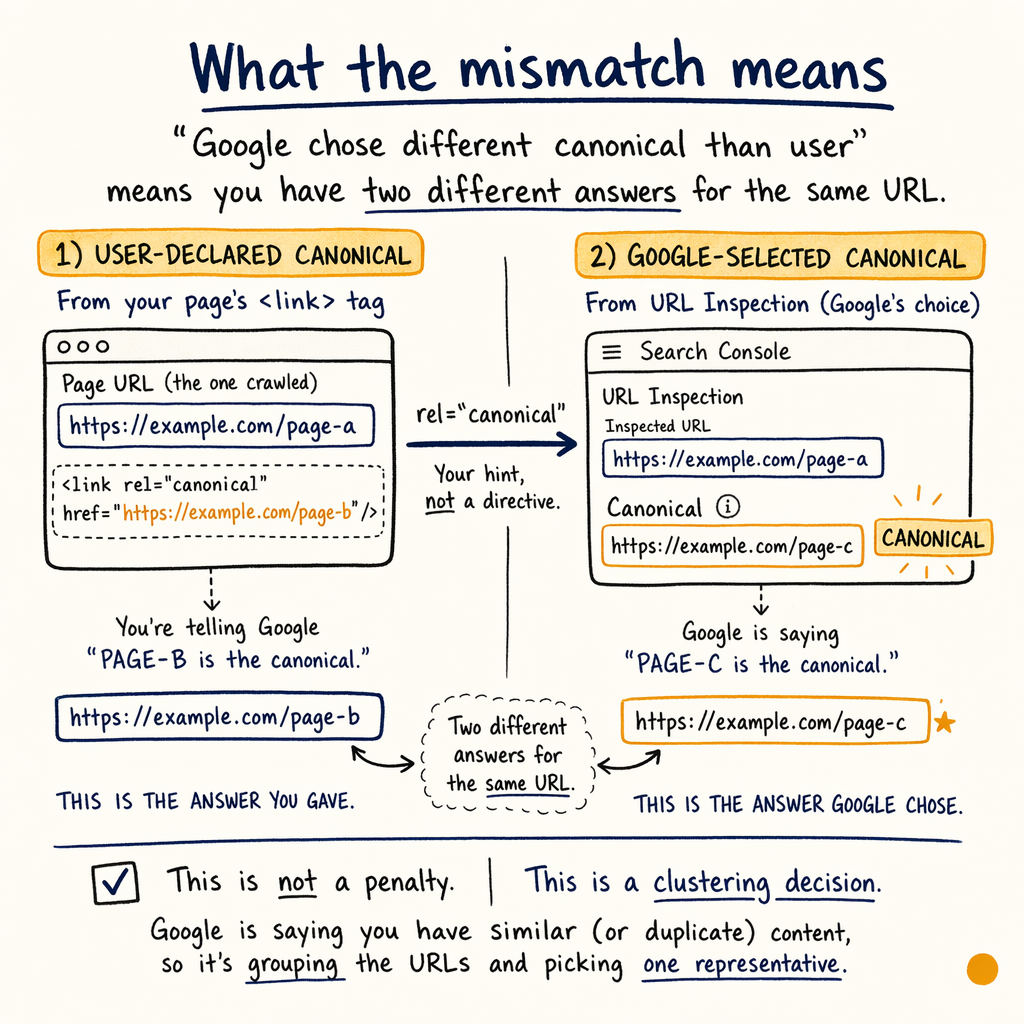
What the mismatch means
If Google shows “Google chose different canonical than user”, you have two different answers for the same URL. The user-declared canonical is the <link rel="canonical"> tag. The Google-selected canonical is the URL Google picked in URL Inspection.
That is not a penalty. It is a clustering decision. Google is saying your preferred URL is not the strongest representative of the duplicate set.
On enzymes.bio, the numbers made that obvious: 16,100 indexed pages, 591,000 not indexed, 557,000 impressions/mo, and only 1.4% sitewide CTR. With 0 external backlinks, Google had very little off-site signal to trust, so internal consistency had to do the heavy lifting.
Why Google overrides canonical
Content similarity is weak
If the duplicate is not near-identical, Google may ignore the tag. This happens when titles, copy blocks, structured data, or parameter variants drift too far apart.
Internal links point elsewhere
Google reads your internal linking as a vote. If nav, breadcrumbs, related products, and XML sitemaps consistently point at the non-preferred URL, the override becomes predictable.
Signals conflict across versions
If http, https, www, non-www, trailing slash, or language alternates disagree, Google may pick the URL with the cleanest cluster.
External authority is missing
With 0 external backlinks, canonical selection depends more on on-site signals than usual. That makes crawl consistency, sitemap hygiene, and self-canonical accuracy much more important.
Check GSC signals first
Start in Performance › Search results, then move to Indexing › Pages and URL Inspection. You want to compare the canonical set, not just the failing URL.
Look for patterns:
- One template only, or sitewide.
- Parameter URLs vs clean URLs.
- Language variants from TranslatePress across 35 languages.
- Pages with avg position 12.4 overall, or 11.8 in May 2026, where Google may be testing a different representative URL.
Indexing › Sitemaps and whether the preferred one is actually linked from the pages that matter.Inspect the canonical tags
<link rel="canonical" href="https://example.com/preferred-url/" />
<link rel="alternate" hreflang="x-default" href="https://example.com/preferred-url/" />
<link rel="alternate" hreflang="en" href="https://example.com/preferred-url/" />

<!-- Bad pattern: self-canonical conflicts with parameterized internal links -->
<a href="https://example.com/preferred-url/?utm_source=newsletter">Product</a>

<!-- Better: internal links point to the same clean URL Google should index -->
<a href="https://example.com/preferred-url/">Product</a>
Fix the source signals
- 01
Make the target URL the default
Update nav, breadcrumbs, related links, XML sitemap entries, and faceted paths so the preferred URL is the dominant one. This is where
Enhancements › BreadcrumbsandIndexing › Sitemapsexpose bad defaults fast. - 02
Reduce duplicate variants
If filters, sorting, language, or tracking create near-duplicates, consolidate with canonicals, redirects, or noindex rules. Use fix duplicate without user selected canonical when the issue is duplicate generation itself.
- 03
Align content and structured data
Titles, H1s, price blocks, JSON-LD, and breadcrumbs should all describe the same entity. Mismatched product snippets can push Google toward a different URL in
Enhancements › Product snippets. - 04
Check crawl and fetch behavior
Use
Settings › Crawl statsto see whether Googlebot spends too much crawl budget on parameters, thin pages, or redirect chains. If crawl paths are noisy, canonical selection gets noisy too.
User-declared vs Google-selected
| Field | User-declared canonical | Google-selected canonical |
|---|---|---|
Source | in HTML | URL Inspection result |
Who sets it | You | |
Best use | Preferred URL hint | Final indexing choice |
Failure mode | Wrong URL in the tag | Canonical override |
Fix path | Correct tag, internal links, sitemap | Remove conflicting signals |
Test with curl
curl -I https://example.com/preferred-url/
curl -I https://example.com/variant-url/?sort=price
curl -s https://example.com/preferred-url/ | grep -i canonical
curl -s https://example.com/variant-url/ | grep -i canonical
Handle edge cases
Some cases are not a simple tag fix. If the duplicate set spans products, categories, and translated versions, the page can look consistent to you and fragmented to Google.
Watch for these edge cases:
- Canonical points to a URL blocked by robots.txt.
- Canonical points to a URL that 404s, 302s, or chains redirects.
- hreflang pairs conflict with the canonical target.
- Pagination or faceted navigation creates more variants than your canonical model can explain.
Verify the canonical win
After the changes, re-test in URL Inspection. You want the user-declared canonical and Google-selected canonical to match, or at least converge after recrawl.
Use this evidence chain:
Indexing › Pagesshows the preferred URL indexed.Performance › Search resultsshifts clicks toward that URL.Links › External linksis not the fix here, but it tells you whether off-site signals exist.Experience › Core Web Vitalsstays clean so performance does not muddy the cluster.
FAQ
Is “Google chose different canonical than user” a penalty?
No. It means Google picked a different representative URL than the one in your <link rel="canonical">. Treat it as a signal mismatch, not a manual action.
What usually causes a canonical override?
The common causes are duplicate or near-duplicate content, conflicting internal links, redirects, hreflang mistakes, or a canonical target that is weak, blocked, or unstable.
Can internal links override the canonical tag?
Yes, indirectly. Google weighs internal linking heavily when deciding which URL best represents a cluster, especially when external backlinks are absent.
Should I noindex the duplicate pages?
Only if they do not need to rank or be surfaced. If the duplicates are functional variants, canonicalize them and remove conflicting signals instead.
How long does it take to fix?
Usually one crawl cycle plus validation. If the site has strong signal conflicts, it can take longer than a few recrawls to settle.