Fix sitemap could not be fetched in GSC
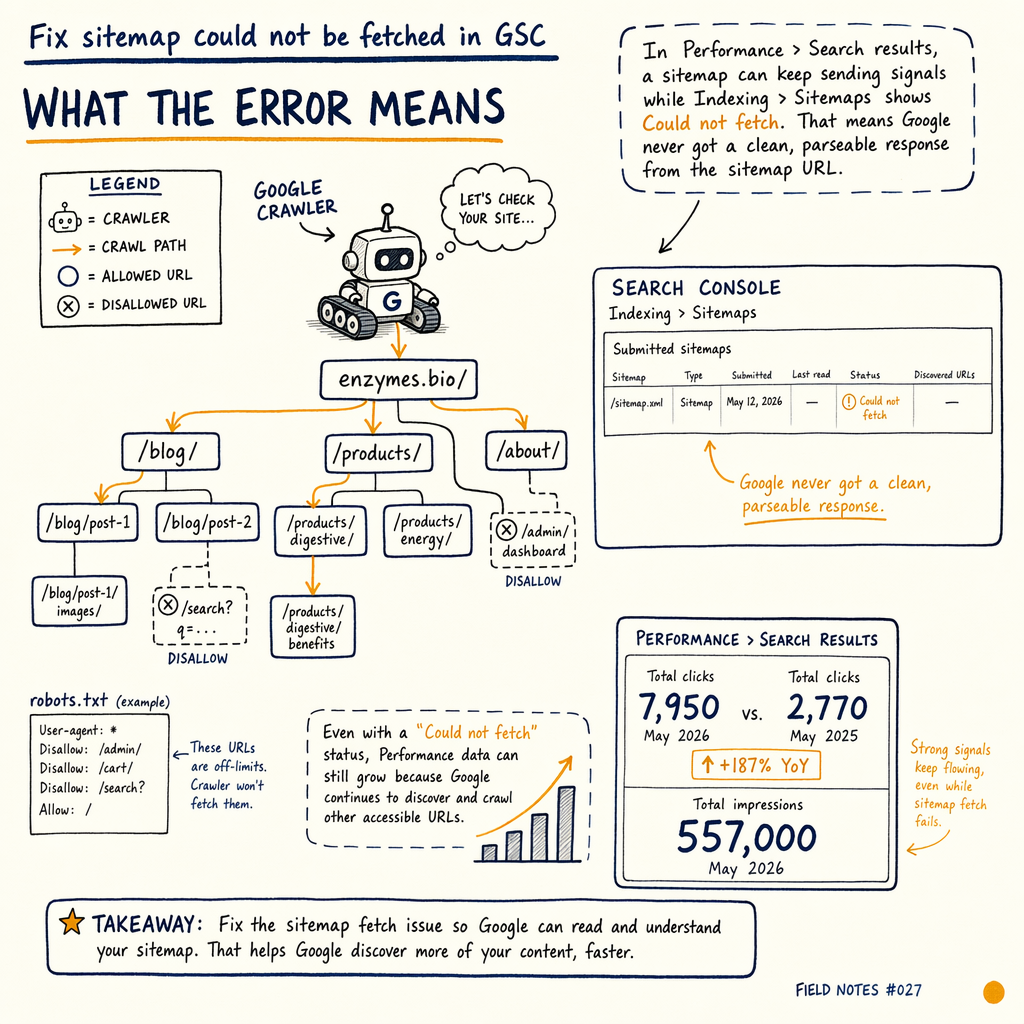
**`sitemap could not be fetched` is usually not a Google bug.** It is a transport, robots, XML, or server-path problem that blocks discovery before indexing even starts. On enzymes.bio, `16,100` pages are indexed and `591,000` are not, so sitemap health matters.
What the error means
In Performance › Search results, a sitemap can keep sending signals while Indexing › Sitemaps shows Could not fetch. That means Google never got a clean, parseable response from the sitemap URL.
On enzymes.bio, GSC shows 7,950 organic clicks/mo in May 2026, up from 2,770 in May 2025, with 557,000 impressions/mo and a 1.4% sitewide CTR. The site has 16,100 indexed pages and 591,000 not indexed pages, so a broken sitemap can easily slow discovery for the next batch of URLs.
The error is usually one of five things: a bad URL, a redirect chain, a non-200 response, malformed XML, or a server layer that blocks Googlebot before the file is served.
Check the sitemap URL
Use the exact final URL
Submit the canonical sitemap location, not a landing page, vanity path, or old /sitemap.xml.gz if the file moved. Google wants the final address to return 200 directly.
Remove redirect chains
A single 301 is usually tolerable, but 301 -> 302 -> 200 is a smell. If the sitemap submission fails intermittently, compare the live URL with the response in tools/sitemap-comparator.
Avoid auth walls and geo blocks
If the file requires cookies, basic auth, or country-specific access, Google can see 401, 403, or soft-block HTML instead of XML. Sitemap URLs should be public and boring.
Test the response
curl -I https://example.com/sitemap.xml
curl -I https://example.com/sitemap.xml.gz
curl -L --compressed https://example.com/sitemap.xml | head -n 20

# What you want:
# HTTP/2 200
# content-type: application/xml or text/xml
# content-encoding: gzip only when the body is actually gzipped
# no login page, no challenge page, no error template
Inspect robots and headers
Google can fetch a sitemap only if robots.txt does not block the sitemap path and the response headers are sane. Check Disallow rules, wildcard mistakes, and accidental blocks from deployment tooling.
Use Indexing › Sitemaps and Settings › Crawl stats together. If crawl volume drops while sitemap fetch errors rise, the problem may be server-side rather than content-side. For a broader crawl diagnosis, pair this with indexing issue troubleshooting and coverage report errors.
Find server-side failure modes
- 01
Check status codes first
Hit the sitemap directly and log the status.
200is good.301and302add risk.304can hide cache problems.404and410mean the file is gone.429means rate limiting.5xxmeans the origin or edge is failing. - 02
Read server logs
Filter Googlebot requests for the sitemap path and compare them to browser hits. If humans get
200and Googlebot gets403, the issue is bot filtering, not XML. If both get5xx, inspect deployment, PHP, origin timeouts, or upstream cache. - 03
Check file size and generation
Large sites can ship a sitemap index plus many child files. Keep each file within practical limits and confirm the generator is not truncating tags, escaping ampersands twice, or dropping the closing
</urlset>.
Common response patterns
| Field | Healthy | Broken |
|---|---|---|
HTTP status |
|
|
Body | Valid XML | HTML error page or partial XML |
Compression | Gzip only when declared | Mismatched |
Robots access | Allowed | Blocked or rewritten |
Google Search Console | Fetched | Could not be fetched |
Validate XML and compression
A sitemap fetch error gsc often comes from gzip corruption or malformed XML. If the file is compressed, the server must send the correct Content-Encoding: gzip header and a valid binary gzip body. If the file is plain XML, do not gzip it twice at the edge.
Common XML mistakes: unescaped &, invalid namespace declarations, bad lastmod values, and mixed encodings. Re-save the sitemap as UTF-8, then test the raw response with browser DevTools. In the Network panel, confirm the sitemap returns 200, the body starts with XML, and no Cloudflare or origin error page is injected.
If you manage multilingual URLs, compare generated output against XML sitemap best practices so alternate language paths do not bloat the file or introduce bad URLs.
DevTools checks
// Chrome DevTools > Network
// 1. Load /sitemap.xml
// 2. Check Headers
// 3. Check Preview / Response

const response = {
  status: 200,
  contentType: 'application/xml; charset=UTF-8',
  contentEncoding: 'gzip',
  note: 'No HTML error template, no redirect loop, no challenge page'
};

console.log(response);
Use logs and crawl stats
If the sitemap is valid but Google still reports sitemap not fetched, look at Settings › Crawl stats. A sudden spike in 429 or 5xx responses can starve Googlebot, which makes sitemap fetches less reliable and slows discovery across the site.
This is where crawl budget becomes practical, not theoretical. If the origin is busy serving filtered pages, the sitemap fetch can lose priority. For a site with 35 languages via TranslatePress, noisy duplication can increase crawl load without improving indexed coverage.
Use logs to answer three questions: did Googlebot request the file, what status did it get, and how long did the origin take to answer?
Fix edge caching issues
If you use a CDN or edge worker, bypass dynamic transforms for sitemap routes. Do not minify XML. Do not inject scripts. Do not cache 403, 404, or 5xx responses as if they were the sitemap.
A good pattern is route-level bypass: /sitemap.xml, /sitemap_index.xml, and child sitemap files should go straight to origin or a known-good cache object. If you need a worker, keep it deterministic and test it with curl from a clean network path.
When the sitemap finally returns clean 200 responses, resubmit it in Indexing › Sitemaps and watch for the fetch status to flip from error to success.
Recovery checklist
- ✓
Confirm the sitemap URL returns
200without redirects. - ✓
Check
robots.txtfor accidental blocks on the sitemap path. - ✓
Verify XML is well formed and UTF-8.
- ✓
Verify gzip is declared correctly and not double-compressed.
- ✓
Inspect Googlebot hits in server logs for
403,429, and5xx. - ✓
Bypass Cloudflare Worker logic on sitemap routes.
- ✓
Resubmit in
Indexing › Sitemapsafter the fix.
Common questions
Why does Google say sitemap could not be fetched if the file opens in my browser?
Browsers can mask problems. Google may hit a cached 302, bot filter, challenge page, or bad gzip object. Test with curl -I and log Googlebot responses.
Can a sitemap be too large?
Yes. Very large files can time out, get truncated, or fail during generation. Use a sitemap index and split child files so each fetch stays fast and predictable.
Does robots.txt block sitemap submission?
It can. If robots.txt blocks the sitemap path, Google may not fetch it. Keep sitemap URLs accessible even if many page URLs are disallowed.
How do I know it is fixed?
In Indexing › Sitemaps, the status should change from fetch error to success. Then check whether discovery improves in Performance › Search results over the next crawl cycle.
Should I audit the whole site if this keeps happening?
Yes, if the issue repeats after a clean fix. That often means a deeper crawl, server, or edge configuration problem. A full services/technical-seo-audit review is the faster path.