Robots.txt best practices for crawl control
**If Google is wasting crawl on the wrong URLs, robots.txt is usually the first file to inspect.** On enzymes.bio, `16,100` pages are indexed while `591,000` are not, so every directive needs to be intentional.
Why robots.txt still matters
On enzymes.bio, Google Search Console shows 7,950 organic clicks/month in May 2026, up from 2,770 in May 2025, with 557,000 impressions and only 1.4% CTR. The site also has 16,100 indexed pages, 591,000 not indexed, and 0 external backlinks. That makes crawl control a real rate-limiter, not a theory.
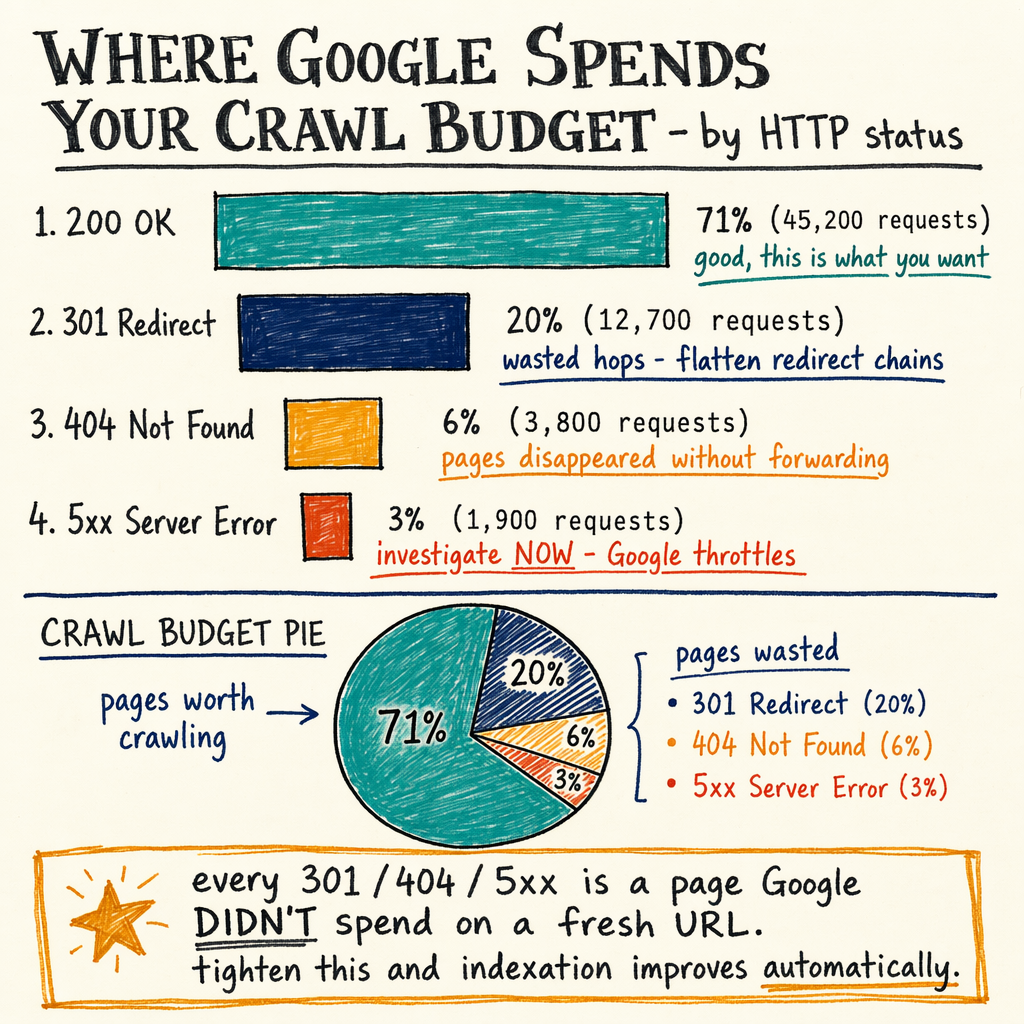
robots.txt does not index pages. It tells bots where not to spend fetches. That matters when a site has faceted URLs, translated paths, parameter junk, staging leftovers, or duplicate product variants. It also matters when the server starts returning 429 or 5xx, because crawlers then waste retries instead of discovering useful URLs.
For SEO, the file is a routing layer. Use it to keep bots away from low-value or risky paths, then confirm the result in Performance › Search results, Indexing › Pages, Settings › Crawl stats, and Links › External links. If the crawl graph is bad, the file is often one of the first fixes.
How robots.txt syntax works
User-agent targeting
Match a crawler by name, then apply rules under that block. User-agent: * is the catch-all. Specific bots override generic rules when both match.
Allow and disallow
Disallow blocks path prefixes. Allow opens exceptions inside blocked paths. Order matters less than match length, so the more specific path usually wins.
Sitemap references
A Sitemap: line can point crawlers at your XML file. Keep the URL absolute and return 200, not a redirect chain. Pair this with XML sitemap best practices.
Wildcard matching
Google supports and $. Use them carefully. Disallow: /? blocks parameter URLs, while $ anchors the end of a path. This is useful for robots.txt wildcard cleanup.
No crawl-delay in Google
Google ignores Crawl-delay. Some other bots may read it, but do not rely on it for crawl budget. If you need fewer fetches, block wasteful paths or fix server speed.

Disallow vs noindex
Disallow and noindex solve different problems. Disallow stops crawling. noindex asks the bot to crawl, see the directive, then drop the page from index.
If a page is already blocked in robots.txt, Google cannot usually fetch its noindex tag. That is the classic mistake behind accidental index bloat. People block disallow vs noindex in the wrong order, then wonder why thin pages stay visible.
Use this rule set:
- Block crawling with
robots.txtwhen the URL has no SEO value and does not need indexing. - Use
noindexwhen the URL must be crawlable but should not rank. - Use canonical tags when duplicates should consolidate signals.
- Never block the only canonical path if you expect Google to evaluate it.
What each directive does
| Directive | Stops crawl? | Stops index? |
|---|---|---|
robots.txt | Yes, for matching paths | Not reliably by itself |
| No | Yes, after crawl |
Canonical tag | No | Indirectly, by consolidation |
| No | Yes, after crawl |
401 / 403 response | Usually yes | Usually yes |
404 / 410 response | Yes, once processed | Yes, after removal |
Rules that break sites
- 01
Do not block CSS or JS
If Google cannot fetch rendering assets, it may misread page content or layout. Check
Indexing › Pagesfor rendering-related issues before you lock down/assets/,/static/, or theme bundles. - 02
Do not block canonical pages
A blocked canonical URL can still exist in search as a stale or URL-only result. If the page should rank, let Google crawl it and validate the final status code is
200, not302or404. - 03
Do not use robots.txt for removals
If a product is gone forever, return
410or404. If it is temporary, usenoindexor a short-lived302.robots.txtonly hides the crawl path; it does not clean index state. - 04
Do not blanket-block parameters
Some query strings are useful for sorting or tracking; others create crawl waste. Block only the ones that generate duplicate pages. Compare
Settings › Crawl statsbefore and after changes. - 05
Do not ignore redirect chains
A
301should point to the final target, not another302. Crawlers can still waste budget on chains. Keep the robots file at a single stable URL:/robots.txt.
Crawl budget and logs
Crawl budget is not just size. It is the mix of demand, freshness, host capacity, and wasted fetches. If Googlebot spends time on blocked filters, duplicated language variants, or endless parameter URLs, discovery slows down.
That is why Settings › Crawl stats matters. Watch fetch volume, response time, and file type splits. Then compare against server logs. If logs show repeated hits to 404, 410, 429, or 5xx endpoints, the bottleneck may be server quality, not the robots file itself.
On enzymes.bio, the crawl problem is amplified by 35 languages via TranslatePress. A multilingual setup can create many near-duplicate URLs, which can inflate the not-indexed bucket fast. If your crawl graph looks like that, pair robots cleanup with stronger canonicals and sitemap hygiene. The file supports crawl budget optimization, but it does not replace it. See crawl budget optimization.
Example robots file
User-agent: *
Disallow: /cart/
Disallow: /checkout/
Disallow: /search/
Disallow: /*?sort=
Disallow: /*?filter=
Allow: /search/public/
Sitemap: https://example.com/sitemap.xml

User-agent: GPTBot
Disallow: /

User-agent: ia_archiver
Disallow: /

# Keep this file at https://example.com/robots.txt
# Return 200, not 301/302, for the final robots.txt URL
Cloudflare worker pattern
export default {
  async fetch(request) {
    const url = new URL(request.url);

    if (url.pathname === "/robots.txt") {
      return new Response(
        `User-agent: *\nDisallow: /private/\nSitemap: https://example.com/sitemap.xml\n`,
        {
          headers: {
            "content-type": "text/plain; charset=utf-8",
            "cache-control": "max-age=3600"
          }
        }
      );
    }

    return fetch(request);
  }
};
Check robots at the edge
curl -I https://example.com/robots.txt
curl https://example.com/robots.txt

# Confirm status, cache, and redirects
curl -s -D - https://example.com/robots.txt -o /dev/null

# Inspect whether the file is returning 200, not 301/302
# and whether the sitemap line points to a live XML file.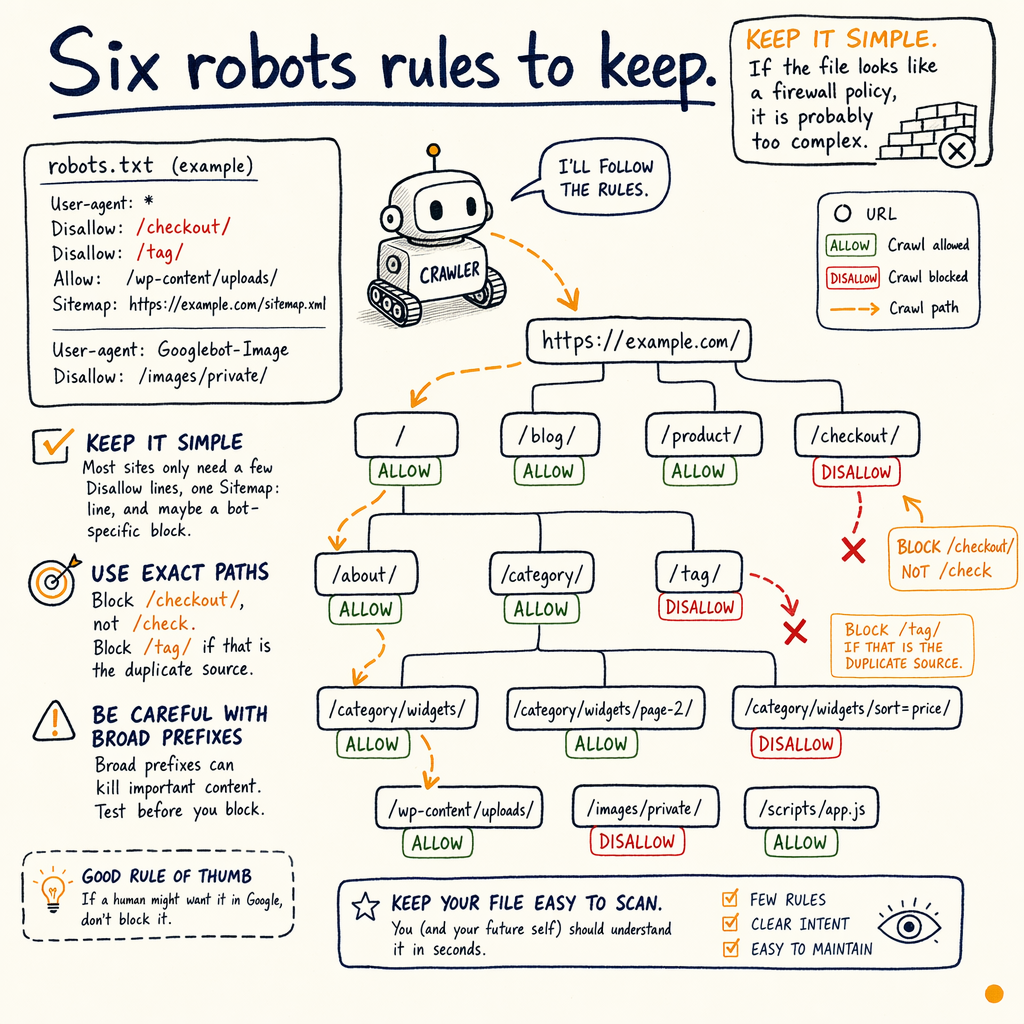
Fix blocked URLs safely
When a URL is blocked by robots.txt, first ask whether it should exist at all. If yes, remove the block and test the response code. If no, return 404 or 410, then let Google recrawl it.
Use Indexing › Pages to find patterns. If the issue is category filters, product variants, or translated pages, adjust the file with a narrow rule instead of a broad directory block. If the issue is a broken deploy, check whether the file changed during the release and whether the server returned 200 for the wrong content.
The cleanest workflow is:
- Confirm the URL in GSC.
- Inspect the live response with DevTools or
curl. - Check robots syntax and wildcards.
- Verify canonicals,
noindex, and internal links. - Re-test after Google recrawls.
Six robots rules to keep
Keep it simple
Most sites only need a few Disallow lines, one Sitemap: line, and maybe a bot-specific block. If the file looks like a firewall policy, it is probably too complex.
Use exact paths
Block /checkout/, not /check. Block /tag/ if that is the duplicate source. Broad prefixes can kill important pages by accident.
Validate with live fetches
Test the served file, not the CMS draft. A typo in production can sit unnoticed while Google keeps fetching the wrong version.
Align with sitemap coverage
Only URLs you want indexed should appear in XML sitemaps. If a URL is blocked and still listed, that is a signal mismatch.
Watch international paths
With 35 languages, translated folders can create a lot of near-duplicate URLs. Robots can reduce waste, but hreflang and canonicals still carry the indexing logic.
Review after every deploy
A header rule, CDN rewrite, or CMS plugin can change the served file without changing the code repo. Re-check after release and after cache purge.
FAQ
What is the best robots.txt setup for SEO?
Keep it minimal: block only low-value crawl traps, expose one sitemap, and leave indexable pages crawlable. For most sites, the best setup is a small file that changes rarely and is always tested at /robots.txt.
Should I use robots.txt or noindex?
Use robots.txt to stop crawling, and noindex to stop indexing after a crawl. If you need Google to see the directive, do not block the page first.
Does robots.txt improve crawl budget?
Yes, when it removes junk URLs from the crawl path. It does not fix slow servers, broken internal links, or endless parameter generation. Pair it with logs and Settings › Crawl stats.
Can robots.txt deindex a page?
Not by itself. A blocked page may stay indexed if Google already knows it. To remove it, use noindex, 404, or 410, then let Google process the change.
What is the safest robots.txt wildcard pattern?
Use the smallest pattern that matches the problem. Disallow: /*?sort= is safer than blocking all query strings. Test every wildcard against real URLs before shipping.
Why does Google ignore crawl-delay?
Google does not use Crawl-delay as a control signal. If crawl volume is too high, reduce wasteful URLs or improve server response instead of depending on that directive.